Standardizing Application End User Licenses

If you have installed an application lately chances are that one of the first screens you have run into is an End User License Agreement (EULA). While it may not be as gargantuan as say the iTunes one, most people don’t bother reading it, and just click on the accept. This numbness to the EULA screen has been bothering me lately. Even though I do it, I have very little idea about what I am agreeing to. I make an assumption that its fair hoping that if it goes beyond what it needs to, I would have heard about that on the internet.

As an app developer, I also worry from the other side of the fence. I want users to know exactly what they are getting and only use my apps if they are comfortable with sharing information with my apps. Additionally I am not a lawyer and I don’t really want to make my own EULA. My apps usually do things very similar to other apps and I just want my users to know that.

Whats interesting is that there is another domain developers work in that licensing comes across often: using third party libraries. However there isn’t that much confusion there anymore. There are a handful of popular licenses out there: The MIT license, the Apache license and GPL are the ones that I run into most often and I am careful to only use the appropriate licensed libraries in my software. However no such named licenses seemed to be shared across multiple end user products today.

I would love to see a few standard licenses appear that encompass certain rights and privileges. For example, an Apache Standard App License that will not hold any user data but the developer is not responsible for damages to the device or injury to user while using the app, or an Apache Social App License that says it will store my friends data and photos for a certain period of time. These would also be great as guidelines for independent developers as well on how they should hold and use end user data.


Quick Video Review: Ubuntu Touch for Android

Ubuntu on Android

I installed the first installable image of Ubuntu Touch for Android devices today, and it was a little tricky since the install instructions seem to assume an audience already running Ubuntu. Either way, I wanted to do a quick review of it but figured a video might do a better job explaining what I was talking about than trying to write em out. The video is embedded below:

The performance of the build isn’t very good but thats expected. I feel the UX is relying a little too heavily on gestures, way too many of them and a lot of “half-gestures” (swipe halfway for action-1 and all the way for action-2). Also the home screen feels too much like an app store and less like a launch board. Pixels wise the UI looks nice and has some nice animations at times (like clicking on a thumbnail of a movie to see the larger image). Will definitely be interesting to see how this evolves.


New to Android? Here are some apps you should try

In the last couple of months, a few of my friends have moved to Android from iPhones. Some of them reached out to me on advice on devices and apps they should install on their new phones. The Android app ecosystem is pretty rich and while there are a bunch of apps that can replicate the functionality of iOS apps, there are a lot more that I find interesting because of how they leverage the unique strengths of the Android platform. I won’t mention the basic apps that I use like Foursquare, Flipboard, GroupMe or the Google apps like Maps and GMail that you can pretty much get on either platform. This post lists some of the apps that I use that make me a big fan of the Android platform.

An integrated music experience with Google Music, Last.fm, Gigbeat and LyricsPlayer
One of my favorite parts of Android is how applications interplay with each other. The music experience is a great example of this.

Android Music

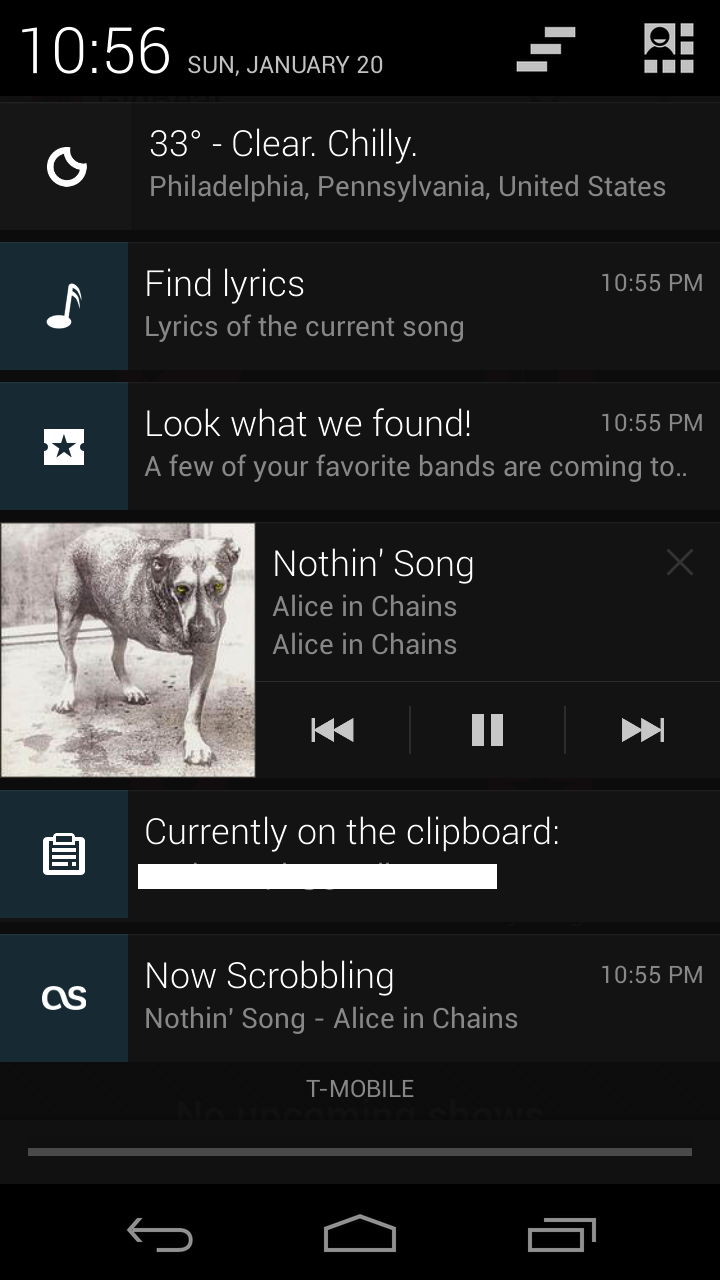
I use Google Music to store my music in the cloud. However I have a bunch of applications that listen to song events and provide different functionality when a song is playing. For example take a look at my notification shade when I have a song playing:
I can control song playback right from the notification shade (Rich Notifications ftw). Additionally, as I play a song, Last.fm scrobbles the song to my Last.fm account. Additionally the LyricsPlayer app offers me a one click link to the lyrics of the song currently playing while Gigbeat searches for upcoming tour dates for the artist.

The photo experience with Panoramas, Photospheres and Instant Uploads
I really love the Android camera app, it was fine before but the recent addition of PhotoSpheres has me completely hooked. I feel it captures the essence of an event or a location so much more. Take a look at my PhotoSphere of the Venetian hotel in Las Vegas when I was there recently for CES (click on the image for the PhotoSphere).
Again, like music playback, taking photos sends a system level event in Android. This enables apps like Dropbox and Google+ to allow instant photo upload services that are pretty useful. I haven’t manually uploaded pictures from my device in ages. Whenever I am ready to share my pictures or view them on a different device, they are just there.
The official Flickr app for Android is pretty mediocre but if you use Flickr, Glimmr for Flickr is an excellent replacement.

AddressBook extensions with LinkedIn, Last.fm and HaxSync
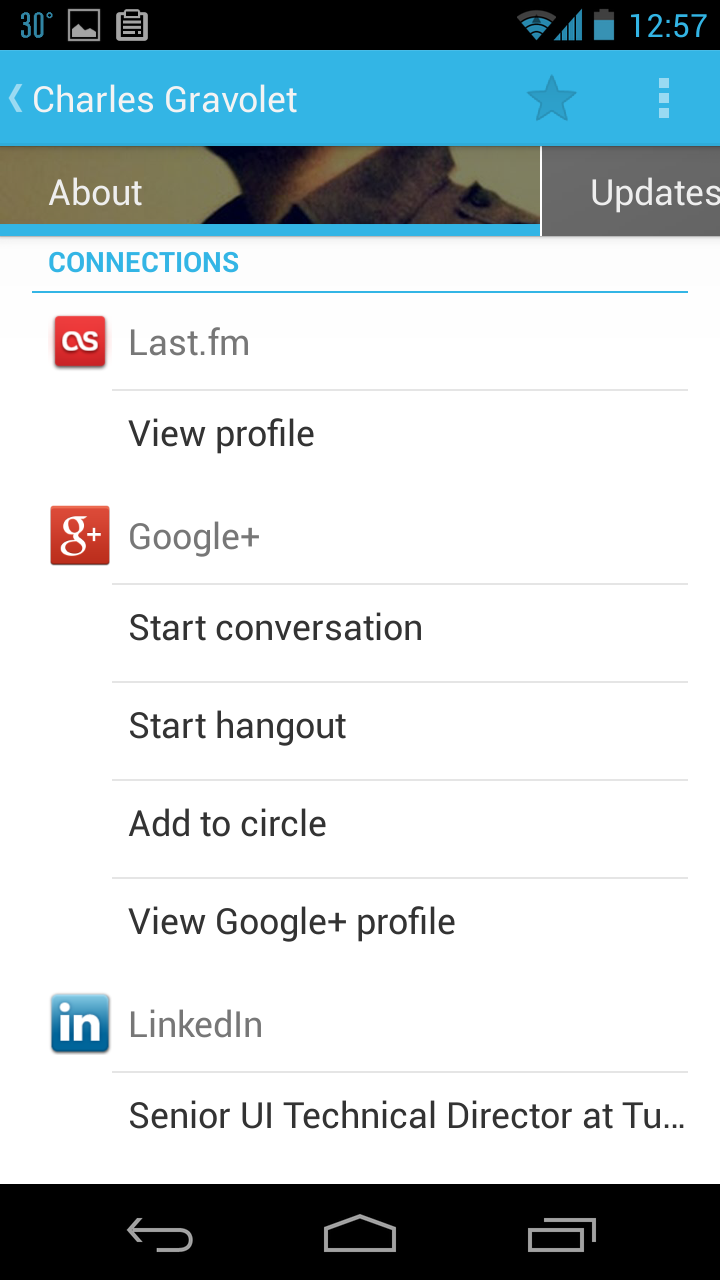
The Android address book (recently renamed to the People App) is really remarkable. It allows applications to annotate user data on the address book with additional information. For example, the LinkedIn application automatically sets a contact’s most recent job title right in the Contact details view. Similarly Last.fm synchronizes your contacts with their Last.fm profiles.

2013-01-21 00.57.54

The people app also allows applications to publish recent status updates right to the app that is available in the contact details as well. This feature is kinda nice, though its a little buried so I don’t use it as much. There are a couple of apps on the Play Store like Current Caller Id that show contact social updates when they call, but they don’t tap into the contact app data. Hopefully the native dialer app will use this data in a future version of the OS. Android doesn’t come with native Facebook or Twitter integration, but you can get Facebook updates in your People app using HaxSync.

Managing files with Astro FileManager, AirDroid and DropSync
A big difference between Android and iOS is that Android devices do let you browse the local file system as well as create folders and files there like a regular computer. You can browse the folders on your PC when the device is connected, but you can also use apps like Astro File Manager to browse the local file system. Another pretty useful app to browse your phone’s content is AirDroid that lets you connect to your device wirelessly as well. The biggest thing I use local file systems for is for auto syncing certain folders among my different devices via Dropbox using DropSync. For example, I have one “Wallpaper” folder that syncs across my Mac, tablet and phone. A different app, the Wallpaper changer, then automatically swaps out my wallpapers once every few hours (again, unlike iOS, Android has a wallpaper api). I also have a dropbox folder called currently-reading that has a bunch of pdfs that sync with a folder my pdf-reader app uses as a source for readable files.

Other notable mentions:

Location based information with FieldTrip: Love this app, it indexes a bunch of news and information against location points and shows them when you are around. I use it more when I am traveling to find random interesting trivia.

Twitter with Tweetdeck or Falcon: Falcon is the new kid on the block for Android Twitter clients, and its pretty nicely done, but I am still stuck on Tweetdeck for Android even though it hasn’t been updated in ages. The fact that it polls for Twitter data in the background means I never have to hit “load” on the app. Its pretty nice and minimal.

Managing Podcasts with DoggCatcher: Lots of features and no need to sync to a device. Never had any trouble with it.

Browser: Chrome / Firefox: I like Chrome on my phone but lately have been trying Firefox and it almost seems faster than Chrome at times. I feel the Firefox UI has a little bigger tappable buttons so it seems a little easier to use, it also has a sync across devices feature and allows for plugins!

Keyboard: I am currently running Swiftkey Beta for Android. Its really well done and I do enjoy using it. Additionally I have been using Google voice a lot for dictation and it works surprisingly well. Bonus points for it working offline.

Google Now is neat

The DoubleTwist Alarm app is my default alarm app. It has some nice features like power nap alarms, etc but I like it mostly for the UI.

Thats most of my suggestions. Let me know if there are any other apps that you use that you find really interesting.

Android Custom Layouts (Part 2): Custom Attributes and LayoutParams

In my previous post, I had written a bit about creating custom Layouts for Android. However to make a truly reusable layout there are a few more things we’d probably need:

  1. Some unique properties that you may want to assign to it via XML (Like LinearLayout has an orientation property unique to it)
  2. Custom LayoutParams object that you can assign to the children of the Layout to assign them properties that the layout can inspect when its laying the children out.
  3. For bonus points, package this container in an external library project so you can reuse the class in a bunch of projects (this will also force you to write truly decoupled code)

Creating custom properties:

Since most often we use XML to define our layouts, it makes sense that we would like to assign configuration properties in the XML file as well. The way you do this is by creating a bunch of declare-styleable nodes in your /res/values/attr.xml file. For example:

<resources>
    <declare-styleablename="MyCustomLayout">
        <attrname="mynewproperty"format="string"/>
        <attr name="mynewproperty2" format="string"/>
    </declare-styleable>
</resources>

The name property of the declare-stylable node should reflect the class-name of your custom View/ViewGroup. The attr node inside references the actual property you are trying to create, You can create a bunch of these properties here. The format of the property can be of the following types:

  • reference
  • string
  • color
  • dimension
  • boolean
  • integer
  • float
  • fraction
  • enum
  • flag

Once you have created the declare-stylable, you have to ensure that those values are visible from the XML document. This is done by adding a new namespace to your application. For example

<com.arpitonline.flint.containers.MyCustomLayout
xmlns:android="http://schemas.android.com/apk/res/android"
xmlns:arpitonline="http://schemas.android.com/apk/res/com.arpitonline.mycoolapp"
... >

The new namespace is just your application package appended to the end of “http://schemas.android.com/apk/res/&#8221;. Now any property specified there will be retrievable in the constructor of your custom Layout which you can retrieve like so:

public MyCustomLayout(Context context, AttributeSet attrs) {
     super(context, attrs);

     TypedArray arr = context.obtainStyledAttributes(attrs, R.styleable.MyCustomLayout);
     CharSequence o = arr.getString(R.styleable.MyCustomLayout_mynewproperty);

          // do something here with your custom property     

     arr.recycle();
}

Note that its good practice to have getters and setters for the property that you are assigning via XML so that the layout can be instantiated just as completely via code. The method described above can be used as is for custom Views as well. For a more detailed explanation see this link.

Creating Custom LayoutParams

As you create custom layouts, you may want to assign properties to the children that the layout may contain. For example, RelativeLayout has properties like layout_centerHorizontally etc that aren’t relevant for children of LinearLayout ViewGroups.

First, you need to create the attributes in the declare-stylable nodes just as mentioned in step 1 usually with the convention MyCustomLayout_LayoutParams. These will be read by your custom LayoutParams object and kept as properties.

The next step is to create a public inner class named (by convention) LayoutParams that extends ViewGroup.LayoutParams. Additionally in the main ViewGroup class, you have to override 3 methods:

  1. public ViewGroup.LayoutParams generateLayoutParams(AttributeSet attrs)
  2. protected boolean checkLayoutParams(ViewGroup.LayoutParams p);
  3. protected ViewGroup.LayoutParams generateDefaultLayoutParams ()

The way this works is if there are custom layout attributes in the children, you get the attributes when the framework calls generateLayoutParams method and its up to you to generate the LayoutParams object based on the values coming in and return it.

Once that is done, there is a call made to checkLayoutParams which seems to give you one last chance to see if the object you created is something you still want to use to determine layout information. This can be done by looking at the class of the LayoutParams object for example. If you return false here, your generateDefaultLayoutParams method will get called which should return a default layout object that you can use anyway.

The layoutparams object will now be magically available during your onLayout pass and can be looked up by calling the view.getLayoutParams() method which you can then use to size and position that particular view.

External Library Projects

Its convenient to package all your custom code in an external Library Project that your app can reference. Doing so is easy, just create a new Android application and check the isLibrary checkbox in the wizard. Then add the library project to your project by right clicking on your application project and going to Preferences > Android screen and clicking the Add… button.

Note that for a long time it wasn’t possible to add custom attrs in Library Projects, this was fixed in SDK 11

The only gotcha here is that everything you have done in your library project may be in the namespace of your library project but when referencing it in your main application, they are referenced with the namespace of the main application project.

I have started a new project on Github where I’ll post some custom layouts/classes that may be helpful. Its pretty early right now but you can see the above code in action at least at the repository.

Open for Value

My friend Orian has been posting a bunch of interesting entries on his blog on the need for an open alternative to the social services we use today. Personally I am a big fan of open source having released a bunch of projects and UI frameworks under the MIT license. I have a lot of strong thoughts on that so I figured its worth a post.

The conversation is not very new of course, there have been a bunch of attempts at open alternatives to the services we use today. The ones that immediately come to mind include:

In fact, if you google “Open source version of <insert-service-here>” you’ll find a bunch of projects and sometimes even companies that have tried to deliver on the promise of the open web. There have even been academics who have tried to come up with the next evolution of the internet as a whole where our data and connections isn’t held captive by companies who see that as a source of corporate value. These specs unfortunately often become so complex that any company looking to build a new product just chooses to ignore them (think RDF/OWL and the mess that is the semantic web specs). But as I see it, there are still a bunch of problems:

Closed is profitable
At least the way companies are evaluated today, closed services tend to be considered very valuable.  So “product companies” will never support a spec that may truly open data if they can help it. Even Google, which has a strong profit motive for an open internet, is building a walled Google+ experience. At this point the people who seem to really be trying to build open systems and “change the world” are those with personal convictions to build open applications where there desire to profit is outweighed by a desire for improving the world we live in.


Will regular people pay for “open”?
People like Dalton Caldwell seem to think so, but I’d disagree. At least the vast majority (non technical) of people probably won’t unless they feel its hugely valuable, and these services can only succeed if a majority of a user’s social network are on the network. Unfortunately, openness isnt so much a product feature a lot of folks care about, its a nice to have. Its like computer backups. Noone cares till the day you lose it all and then its too late. If you are truly going to get people to move to a new product from a product that they have invested a lot of time and effort in, whats the reward? Where is the excitement?


Better > Open
I wish folks would look beyond trying to build open services towards building better services that are open. Differentiate by doing well what the existing service does poorly. A lot of people consider open just a philosophical medal of honor, but its actually a very strong business strategy to disrupt established businesses. Think of Android, Apache, Webkit, Red Hat (the first billion dollar company based on open source). If you do open the right way, you can accelerate beyond your competitors even (especially?) if you arrive late to the party.


A different business model
Over the last few years we have been conditioned for free services and products. What I’d really like to see is true innovation in business models. Something beyond a simple pay or ad-supported service. For example:

  1. Pay for a group: Instead of a service fee of $5 per person maybe its $10 but for 5 invites (don’t have the single user option at all so people actually invite friends who won’t get on otherwise)
  2. Pay for the pipe: Think of a social network based on top of a connectivity service like Dropbox. Pay for the sync service and get a lot of apps on top of it. Apps get a share of the revenue from the service based on usage of the app.
  3. Bid for app extensions: Pay the developers for additions to the app so we don’t have another “I paid startup x but they sold themselves to company y” (ex: Sparrow)

My point is that there may be something really new that we really need to think about instead of just the “ad support” and “pay” model that we currently discuss.


Capturing Bitmaps of Views in Android

One of the most common techniques for animations (regardless of UI technology, Flash, iOS or Android) is to animate a Bitmap of the view being manipulated rather than the actual view itself since animating the view requires moving all subviews and for animations that distort the view dimensions, may cause expensive reflow of the internal components, not to mention the weird glitches as the internal components resize or reflow.

The core animation engines in both iOS and Android do this work for you themselves. When an object is animated, its only its drawing layer that gets moved. Thats why in Android, if you dont call setFillAfter(true) for an animation, the position of the View as Android understands it and its display on the screen diverge and buttons etc become unclickable. In the new Android animation framework introduced in HoneyComb, the animation framework even includes a withLayer() option that is advisable to use that draws the bitmap to a hardware accelerated layer and moves that which would perform better than the software option.

But grabbing the Bitmap of a View has other uses as well (like modifying photographs, taking screenshots of interesting points in a game etc). Here are 2 ways of doing that.

Method 1:

A View can actually draw itself on any instance of a Canvas class (usually at the end of the measurement and layout process, it draws itself onto a Canvas instance that is internal to the View class). So you can pass it a fresh instance of a Canvas thats constructed off a Bitmap object that you created like so:

	Bitmap b = Bitmap.createBitmap(targetView.getWidth(),
				       targetView.getHeight(),
				       Bitmap.Config.ARGB_8888);
	Canvas c = new Canvas(b);
	targetView.draw(c);
	BitmapDrawable d = new BitmapDrawable(getResources(), b);
	canvasView.setBackgroundDrawable(d);

Method 2:

This way was mentioned in a couple of posts I read, but there is a gotcha. This involves getting a Views drawingCache which is a Views own reference to its bitmap. Note that drawingCaches aren’t always available and so you may need to actually have the View generate it. You can do this by either setting setDrawingCacheEnabled(true) on the View or manually calling View.buildDrawingCache() and then using the Bitmap generated in the same way as previously mentioned. The gotcha I found was that the generated bitmap can be disposed without your knowledge. Since its recommended that calling the buildDrawingCache should be matched with a destroyDrawingCache(), you have to copy that bitmap data into a bitmap you own.

    targetView.buildDrawingCache();
   	Bitmap b1 = targetView.getDrawingCache();
   	// copy this bitmap otherwise distroying the cache will destroy
   	// the bitmap for the referencing drawable and you'll not
   	// get the captured view
   	Bitmap b = b1.copy(Bitmap.Config.ARGB_8888, false);
   	BitmapDrawable d = new BitmapDrawable(b);
   	canvasView.setBackgroundDrawable(d);
   	targetView.destroyDrawingCache();

The code for this project is on Github as well. Since I am only getting into this aspect of Android, let me know if I there is a better way to do this.

Creating Custom Layouts for Android

There are a lot of great articles on Android development on the web but one field that doesn’t feel explored enough is creating custom Layouts. For one thing, the Android framework does spoil you with a bunch of layouts that usually fit most of the usually designed interfaces. The problem comes when faced with slightly unconventional UIs. A basic knowledge of how layouts work may help you avoid creating a mess of nested layouts when a quick custom one may have sufficed. The design below for example was accomplished with one custom layout object.

I have to admit I am not a fan of some fundamental choices made on the UI architecture side. For one thing Layouts are Views (or more specifically ViewGroups) themselves and not only position and size the elements they are supposed to but also add them as children to themselves. This means that if you wanted to create an experience where you maybe started with a grid of photos and when the user clicks on one of them, lay the photos out in a row, you can’t really do that well since the photos have to be unparented from one View (the GridLayout) and then added as children to another. And don’t hope for any animations in between. In the coming months I hope to create an open source project for some custom layouts that separated a views parent from its layout (Adobe Flex went the same route between Flex 3 and Flex 4. Flex 3 had HBoxes, VBoxes etc but were deprecated in Flex 4 with Spark Layouts that could be attached dynamically. If you are a Flex software engineer, the Android architecture will look very familiar).

But this post explains the layout architecture as is. So lets begin. The attached code blocks are from a custom Layout example I wrote and is available on Github. Its a very simplistic LinearLayout that sizes its children equally. You can grab the github project here.

The base class for a Layout is a ViewGroup that basically extends a View and has hooks for things like addView etc. To create a custom ViewGroup, the only method you need to override is onLayout. The onLayout is triggered after the ViewGroup itself has finished laying itself out inside its own container ViewGroup and is now responsible for laying out its children. It should call the layout method on all of its children to now position and size them (the left and top parameters will determine the child view’s x and y and the right and bottom will determine its width (right – left) and height (top-bottom).

@Override
protected void onLayout(boolean changed, int l, int t, int r, int b) {
     int itemWidth = (r-l)/getChildCount();
     for(int i=0; i< this.getChildCount(); i++){
         View v = getChildAt(i);
	 v.layout(itemWidth*i, t, (i+1)*itemWidth, b);
         v.layout(itemWidth*i, 0, (i+1)*itemWidth, b-t); (Fixed bug mentioned by Nathaniel Wolf in the comments below)
     }
}

One thing to note is that at this point you are playing at the pixel level and not with the pixel abstraction units like dips. But besides that you should be fine.

The problem here is that while this will layout any simple views (i.e. Views that aren’t layouts themselves), any child layout objects aren’t visible at all. This is because the child layouts have no idea till that time how they should lay out their own children since they haven’t been measured at all and return a measured width and height of 0. To do a layout correctly, you need to make sure that you also override the onMeasure method in your layout and call the measure method on each of your children appropriately.

During measure, you need to first calculate your own measuredWidth and measuredHeight and then based on that tell your children how they need to size themselves. For example a horizontal LinearLayout might say “My measuredWidth is 100 plxels and I have two children so each must measure exactly 50 pixels. This it would do my passing a MeasureSpec object which defines how the child should interpret the measurement its receiving: either EXACTLY, AT MOST or UNSPECIFIED. The child view then uses those cues to create its own measuredWidth and measuredHeight (by usually calling setMeasuredDimension at some point in the onMeasure).

@Override

protected void onMeasure(int widthMeasureSpec, int heightMeasureSpec){

     //At this time we need to call setMeasuredDimensions(). Lets just 
     //call the parent View's method 
     //(see https://github.com/android/platform_frameworks_base/blob/master/core/java/android/view/View.java) 
     //that does:
     //setMeasuredDimension(getDefaultSize(
     //                       getSuggestedMinimumWidth(), widthMeasureSpec),
     //                    getDefaultSize(
     //                       getSuggestedMinimumHeight(), heightMeasureSpec));
     //		

      super.onMeasure(widthMeasureSpec, heightMeasureSpec);
      int wspec = MeasureSpec.makeMeasureSpec(
                  getMeasuredWidth()/getChildCount(), MeasureSpec.EXACTLY);
      int hspec = MeasureSpec.makeMeasureSpec(
                  getMeasuredHeight(), MeasureSpec.EXACTLY);
      for(int i=0; i<getChildCount(); i++){
         View v = getChildAt(i);
         v.measure(wspec, hspec);
      }
}

Note that the measuredWidth and measuredHeight are cues for the parent layout when its laying out the children. It might still decide to ignore the measured width and height and lay them out as it feels since its up to it to define the left, right, top, bottom values during onLayout but a good citizen of the layout world will probably not ignore them.

Also I am just getting into this so I may have missed something so please drop me a comment or let me know on Google+ and we can have a discussion.

[Update 1] I have written an extension to this post that includes adding custom attibutes and layoutparams to your layout class

[Update 2] Great talk on this topic from Google I/O 2013

Notes from the AnDevCon III Conference

For the last few months I have been doing quite a bit of work on the Android platform. Its no secret that I am a big fan of the Android OS both technically and philosophically. Needless to say, I was really excited to be able to attend AnDevCon III conference earlier this month for both the opportunity to learn some new things about the framework as well as interacting with some of the stars of the developer community. The event, held in Burlingame (SF), did not disappoint. It was amazing to meet folks like Chet Haase, Romain Guy, Jake Wharton, Mark Murphy, etc and hear them speak as well as meet some awesome local devs doing amazing work (and thanks to Twitter, I can stalk them forever 😉 ).

I took a bunch of notes which are available in their very raw form on my shared Evernote Notebook here. While most of the sessions were pretty good, some of the more memorable ones are listed below:

  • Romain Guy and Chet Haase‘s talk on best practices for Android UI was probably the most educational giving me a bunch of tips on improving some of my apps’ behavior.
  • Chiu-Ki Chan‘s talk on Android Custom Components was probably the one that I was most desperately looking for. The talk was fantastic and we hit it off pretty well. She is a coding machine and already has another app out there on the Sony Smartwatch she won there.
  • Kirill Grouchnikov‘s talk on Responsive Mobile Design for Android was great and laid out some great tips on how to create screen-size aware interfaces for Android applications.
  • Mark Murphy‘s talk on App Integration was very eye opening. I was already pretty aware of the Android Intent system that allowed data to flow between applications seamlessly, but he laid out a bunch of other ways apps can be integrated with each other, like sending the complete UI to another app using Remote Views, app plugins etc. Also I didn’t realize Mark was a local guy, so maybe we can coerce him to coming to one of the Android group’s talks in the near future.
  • Jake Wharton gave a great talk on his libraries. The guy is a celebrity in Android circles and I already use his ActionBarSherlock library on some projects but I didn’t realize he had ported Android 3.0’s animation system to work on pre-HoneyComb devices as well via his NineOldAndroids library (Very useful for my current project). His other projects like ViewPagerIndicator and HanselAndGretel were pretty cool as well.
  • Blake Meike‘s talk on Concurrency in Android was probably the most packed session besides the official Google talks. Listening to his talk I realized how little attention I had been paying to possible concurrency issues in some of my apps. There was great back and forth with the audience in the session on a bunch of details on Android application lifecycle.
  • Aleksandar Gargenta‘s talk on Android Services and how IPC works across the Android system at the lowest level was fascinating. While I don’t see myself ever writing or needing to know the details of the lowest level Android services, it gave me a lot better understanding of what Android/Linux is doing when different actions are performed.
  • Joshua Jamison gave a great talk on Advanced Design Implementation with some very usable tips on faithfully translating designs to Android applications.

Besides the talks, I really loved the HTC and the Barnes and Noble keynotes. HTC is doing some amazing work with their phones and very carefully navigating the waters of adding functionality to their line of phones and avoiding fragmentation by creating a set of apis only for their phones that differ very slightly in functionality from the core Android OS. The entire HTC keynote was broadcasted to the projector from their phone. They also introduced the new APIs in the latest iteration of Sense including LockScreen, Beats Audio and Video call APIs. B&N gave some rather interesting statistics on the Nook audience, like having over 85% of their audience be women. Android has had a notoriously hard time appealing to women so this statistic was interesting. The Nook marketplace is also apparently very profitable, which I seem to have heard from some other devs there as well (so it wasn’t just PR), though the conspiracy theorists attribute that to their curated market being fairly small. Their talk on thinking of apps as content (like books) was pretty good. Though the best part may have been winning the Sony Smartwatch draw at the end of the conference. The watch actually has a very interesting architecture with most of the user interface generated on the paired mobile phone and the watch itself being just a dumb screen. I hope I get some time to play with the SDK soon.

I missed most of the after event parties since I had a truckload of work to do for a project due the immediate next week (I was sneaking off to write iOS code which is kinda ironic), but did make it a point to attend Square’s dessert bash. In my book they also won the award for best schwag t-shirt ever.

P.S: My friend and fellow Android Alliance organizer Chuck Greb has already posted his notes from the event on his blog.

Friending non-humans: A lazy foodie’s hack for the Android address book

Probably not one my best characteristics but I do tend to order in a lot of food from a variety of places near my apartment. There are also enough places around where I live that I end up trying a bunch of different places and then when a familiar menu comes up again I am often left wondering “what did I eat there the last time, and how good was it?”.

I was half tempted to create a food journal app specifically for delivery food. Think of it as a Foodspotting / Foursquare app but more like a personal diary than a social app. Neat idea I guess, except I have almost no time these days. But then I got thinking: the People app on Android exposes a bunch of new social apis that I felt I could maybe use in some manner. Could I use the Android People app be used to “friend” my favorite delivery places?

One of the things Android has going for it for something like this is the Intents system and inter-app communication that are very core to the OS. This means quite a few applications are open to external data or expose their own data to external apps. My end “hack” basically involved creating a contact to represent each of my more regular delivery places and wiring it to different apps via URL patterns registered by some apps that I could find online. Since you can add many web links to each contact, I added a couple:

  1. A link to the mobile foursquare URL for the location. Since the Foursquare app registers itself as a handler to those links, clicking on the link on the contacts app launches the foursquare app for that location.
  2. A Google Docs file url where I can write about the dishes I ate at that place. Once again, since the Google Docs (now Drive) app registers itself as a handler for those urls, using that on the phone works well enough.

Check out the video below to see it in action:


My original goal was to tie it to my Foodspotting profile but that app does is completely closed and does not respond to any local intents or URLs.

For the most part this does let me do what I wanted to do. Look up the latest reviews/tips about a place, put down my thoughts about different dishes I tried there and then call them if I feel like it. In a more complete app that leveraged the people app social apis even more, the photos representing the places could also change, maybe representing a special dish or something.

But it does make me think the idea of contacts really does need to expand beyond the people in my life. I mean by definition, isn’t anything you can call or contact for more information a contact? Why can’t I  save a particular restaurant from Foursquare directly as a contact to my address-book since I usually call the place and not really a person there? Extend this thinking and you realize there are a bunch of “things” you often call: the taxi service, the hospital, the utility company, etc.

A lot of these thoughts are also probably a result of my reading reading a particular thesis by  John Kestner, an MIT student on creating “A Social Network for Lonely Objects“. Its a fascinating read and I definitely recommend it.

All of this also involves a rethinking of fundamental parts of the data that define a contact. VCards are a very human concept but we need to morph that construct into a more unstructured form, so that a contact of a particular type can create data fields relevant to it. The internet is already evolving to embrace unstructured data with NoSQL databases and such.

Kinda ironic that Android recently renamed the Contacts app to the People app in ICS 😉

Ice Cream Sandwich designs on Android

The biggest critique for Android (besides software update uncertainties) for the longest time has been the poor design of most Android apps. While some app developers did do a good job with their apps, the lack of any kind of design guidelines for developers meant everyone was finding his own way to create a good experience on the platform. This also meant that apps tended to look very different from each other.

The introduction of Ice Cream Sandwich design guidelines at the beginning of this year seemed to be a step in the right direction, but in the back of my head I was worried it could be a little too late. Fast forward merely 3 months and things are very different. More and more applications are conforming to the new guidelines and they look GREAT. The great thing is that with frameworks and libraries like the Android Compatibility Library,  ActionbarSherlock, ViewPagerIndicator and HoloEverywhere, the design guidelines can be used for pre-ICS apps as well.

Roman Nurik seemed to have the same thoughts in his mind so he started a Google+ thread on it . I wanted to take a few screenshots and share them here but as I started saving the images, there just seemed too many to list. So instead I just saved a bunch of apps to a Tumblr account. Check it out and follow it if you’d like to track updates. While I’ll keep adding to that as I find more, if you see and app that you’d like to see there, drop me a comment here or message me on Twitter or Google Plus

http://ics-apps.tumblr.com