Notes on Game Mechanics

The recent explosion of “game based” apps out has led me to read quite a bit about the topic. Here are some notes on books, articles and presentations I have been reading:

Some Rules for Game-Based Systems (from the book Game Based Marketing):

  • Favor long term loyalty not short term competitions
  • Dont offer direct prizes, offer virtual points. Real world value of virtual points can be tweaked at the time of redemption.
  • Virtual points can also be used for virtual goods. Virtual Goods Economy is 5.5 Billion Dollars
  • Does redemption matter? Huge number of points are almost never redeemed
  • Top 5% of airline customers generate 40% of the revenue
  • Create opportunities for elite members to show their eliteness (like lounges in Airports open only to elite members)
  • Create artificial scarcity and rewards around it.
  • First reward should be soon
  • Casino style *random* rewards create short cycle reinforcement
  • Need both long term goals (level ups) and short term (mini games/challenges)
  • All game based systems need:
    • Large community
    • Point System
    • Simple Communication platform

Types of Players (from the book Game Based Marketing):

Four Player types based on motivation:
Achievers
Go to great lengths to get rewards
Dont care for winning in a vacuum: need an audience (leaderboards)
Need the Socializer
Socializer:
Want to build meaningful interactions
Often are more about helping others win rather than winning themselves
Explorers:
Need rich virtual worlds to explore
Love to share detailed accounts of their explorations
Long games with repeated actions bore them
Killers:
Need simulated win & lose conditions
** The Naive Player **
Fairly unaware
Need to be made aware that a game is going on
  • Achievers
    • Go to great lengths to get rewards
    • Dont care for winning in a vacuum: need an audience (leaderboards)
    • Need the Socializer
  • Socializer:
    • Want to build meaningful interactions
    • Often are more about helping others win rather than winning themselves
  • Explorers:
    • Need rich virtual worlds to explore
    • Love to share detailed accounts of their explorations
    • Long games with repeated actions bore them
  • Killers:
    • Need simulated win & lose conditions
  • The Naive Player
    • Fairly unaware
    • Need to be made aware that a game is going on

A really awesome presentation on the shallow game design that seems to be creeping into web properties by Sebastian Deterding

“Yet when I look at most gamified applications today what they do is use game elements to tie us even more tightly into our worldly toils and schemes. They are glorified report cards that turn games into work rather than life into play, and users into pawns instead of players”

Pawned. Gamification and Its Discontents

The secret to Farmville’s popularity is neither gameplay nor aesthetics. Farmville is popular because in entangles users in a web of social obligations. When users log into Facebook, they are reminded that their neighbors have sent them gifts, posted bonuses on their walls, and helped with each others’ farms. In turn, they are obligated to return the courtesies.

  • Farmville is defined by obligation, routine, and responsibility;
  • Farmville encroaches and depends upon real life, and is never entirely separate from it;
  • Farmville is always certain in outcome, and involves neither chance nor skill;
  • Farmville is a productive activity, in that it adds to the social capital upon which Facebook and Zynga depend for their wealth;
  • Farmville is governed not by rules, but by habits, and simple cause-and-effect;
  • Farmville is not make-believe, in that it requires neither immersion nor suspension of disbelief

Other links:

On User notifications: Alert, Notify, Acknowledge

In any client-side application of reasonable complexity there is a lot going on. There are numerous moments during its lifespan where it might want to communicate to the user of different events: errors, underlying data changes, etc etc. While coding an application, its very convenient to just use the native “Alert” implementation to inform the user of some change in the application state. Every UI framework supports it, and in some cases like the iOS UIKit, it doesn’t look awful almost leading you think it may not be a bad idea.

Unlike people though, all user notifications aren’t made equal. Alerts demand immediate attention (in the case of JavaScript, they stop the entire GUI thread freezing the application, though thats not the case in other UI technologies). Recently I wanted to get rid of the Alert windows I had placed in my rush to get EspressoReader out of the door, and started looking at different notification paradigms out there.

One concept I wanted to borrow from was application logging frameworks like Log4J. Logging frameworks usually define a series of levels that you can use to define the priority of your message, for example in the case of Log4J the levels are:

  1. Debug
  2. Info
  3. Warn
  4. Error
  5. Fatal

While tempting, these dont really map to any order of priority for end user notifications. Looking around the web though,  I did see some interesting ideas around notifications. For example, XUL (Firefox’s UI framework) includes a NotificationBox control:

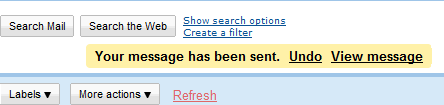
This system seems to be getting pretty popular now, with the Chrome browser UI framework including something similar to that as well. Gmail notifications are in the same vein:

The thing with GMail notifications is that they are closer to the actual interaction that prompted the notification which works well (Fitt’s law in action!)

I guess this system is slowly becoming standard. I really wish “notify” was a built in function in JavaScript similar to “alert” but at least there is a jQuery plugin that seems to add that functionality now.

Another interesting notification system is the fading message box like discussed here, or more famously, as shown by Growl

However, the problem with such notifications is that they are pretty transient (generally fade out), which is often not what you want. I couldn’t really find an official name for these so I call them “acknowledge boxes”. On the importance scale, these seem to the ones with least importance. Another acknowledge notification is an audio clip played when an action is performed, though those need to be used with caution since they get annoying pretty soon.

So here is my sorted list of prioritized notification UIs:

  1. Alert: Most severe, “deal with me now” kind of messages
  2. Notify: Hey something happened. Finish whatever you are doing and then let me know
  3. Acknowledge: Least important “I heard you” kind of messages

If you have any other interesting notification user interface examples, please share them here.

[Video] New Magazine View in EspressoReader: Your Google Reader feeds never looked so pretty

I am pretty proud of the new version of EspressoReader that was released yesterday. While the build included numerous bugfixes, the biggest change in the app is a much improved Magazine View that is centered around the images in a feed. Here is a screenshot +video of the new view:

Magazine View

The view is fully navigable via the keyboard via the directional keys which makes going through a bunch of feed items really easy.  By the way, I will be releasing the core library that does the image fetching under an Open Source license in my next post so stay tuned for that. In the meanwhile, if you are a Google Reader user, go download EspressoReader from the AIR marketplace and give it a shot.

Android Tip: Managing podcasts using Google Listen and Reader

One of the best parts of moving to Android is getting away from iTunes. I have never been a fan of that software and it seems to be getting more and more bloated as time goes by. These days, all I need to do to move songs into my device is just connecting it via USB and dragging the songs into the mounted device.

There are things a few things I do miss about iTunes though. One of them is a subscribing to and managing podcasts. There are a few apps on the Android marketplace I guess but none seemed very good. Yesterday, though I gave Google Listen a try and I think its working out well.

Listen is an Android application released by Google Labs and as you can see from its homepage, it lets you find and subscribe to podcasts. However since it seems to be a fairly new project, the search index seems fairly small and I could only find a couple of podcasts that were interesting to me.

Whats interesting though is that Listen seems to use your Google Reader account to manage the subscriptions. So the podcasts that I had added to my account appeared under a folder named “Listen Subscriptions”. So just to test, I found the RSS feeds for a couple of subscriptions and added them into the same folder. Ta daaa! They immediately appeared in my “Listen” application on my Nexus One.

The coolest part is that the podcasts being managed by listen can actually be streamed to your device when you start listening to it, so no waiting for the download to complete and then sync to device before listening to em. Win!

On Ideas, implementation and iteration

I have way more ideas than I have the capacity to execute.

That seems not an uncommon issue among my friends, and unlike that saying about ideas, I actually dont think everyone has ideas. Or rather, not everyone is passionate about ideas or seeing them through to some kind of product/feature anyway (people often mistake opinions for ideas). But there are definitely a lot of idea people out there. And in today’s hyper connected world, this has enabled a slew of services ranging from idea gathering platforms like Uservoice, Kindling to complete “idea to product” services like Quirky to emerge. [Update: Wall Street Journal has a fantastic article on Ideas that you must read, also my friend Karl Martino has just published a post with 3 other links on ideas]

One thing I have come to agree with is the thought that ideas are merely multipliers of execution, i.e. ideas are great and everything but what really counts is the execution. Occasionally, when someone shares something interesting and someone dismisses it saying “Oh I had that idea a while back”, I wince. Its that kind of thinking that often leads to people posting stuff like this, feeling cheated of success that should have been theirs because they had the idea first.

Execution is everything.

Or is it? Yesterday I read a rather awesome post by Jeff Atwood on the growth of his company (Stack Overflow) and his continued belief in what he calls “Boyd’s Law of Iteration” based on the findings of USAF Colonel John Boyd:

Boyd decided that the primary determinant to winning dogfights was not observing, orienting, planning, or acting better. The primary determinant to winning dogfights was observing, orienting, planning, and acting faster. In other words, how quickly one could iterate.Speed of iteration, Boyd suggested, beats quality of iteration.

The same seems to be true of product development. Jeff references projects like Google’s Chrome and Android and how they are getting to be really successful because of their fast iteration cycles. The official Chromium blog recently published a post on the accelerated release schedules and further mention their three goals for the accelerated releases:

  • Shorten the release cycle and still get great features in front of users when they are ready
  • Make the schedule more predictable and easier to scope
  • Reduce the pressure on engineering to “make” a release

Over the last few years, I have released quite a few projects including:

  • FlexAmp: An online mp3 player that plays audio from an online storage system like Box.net (now broken)
  • DiggGraphr: A treemap visualizer for Digg stories (now broken)
  • EspressoReader: A desktop client for Google Reader

A huge personal milestone for me was EspressoReader’s second feature release. I realized that of all my projects (not including open source libraries like OpenPyro of course), Espresso was the only project that ever had a second iteration that actually evolved the app (my other projects have had maybe one or two minor updates for bugfixes). The funny thing is, I have a lot of personal notes on features for v2 of all of  them.

So here is why I think a lot of my projects never have a significant version 2:

  • The developer itch is gone: I started a project because I was interested in a platform or an API and the part I was curious about is gone.
  • The last 10% sucks: I realize that there are so many edge cases to consider. The app is very demoable but isnt at a point where anyone can actually use it for long without hitting a bug
  • The damn codebase is a mess: To get to the part where the app proves the concept, I have taken shortcuts that have compounded on each other. So now there is a lot of work involved to get the app to a state where it has the same functionality as before but I don’t groan every time I open the project’s source.
  • There is a shiny new toy to play with: These days its iOS and Android, both platforms I am interested in and spend enough time between 9-5 on to be able to take on a project involving em (well more iOS than Android as of now). Its really hard to stay focussed on a platform that is not the shiny new thing.

I hope as I mature as a programmer, I can curb my tendencies to jump off of projects for the above reasons. All I can tell you right now is that there is definitely at least a third version of EspressoReader coming out in the next few days :).

Mark Zukerberg on Social Applications

Techcrunch has a pretty fantastic interview with Mark Zukerberg, CEO and Co-Founder of Facebook. While the whole interview is definitely worth the read, the following part resonated strongly with me:

One thing that I think is really important that I think is context for this, is that I generally think that most other companies now are undervaluing how important social integration is. Right, so even the companies that are starting to come around to thinking, “oh maybe we should do some social stuff”, I still think a lot of them are only thinking about it on a surface layer, where it’s like “OK, I have my product, maybe I’ll add two or three social features and we’ll check that box”. That’s not what social is. Social – You have to design it in from the ground up.

Off late the “social integration” tier of a lot of the new services tends to be “publish this activity to Twitter or Facebook”, and that gets old really fast. Its why I have updates from services like FourSquare set to be filtered out of my Twitter stream. Thankfully Tweetdeck makes it really easy.

Whats new in EspressoReader 0.8: Twitter profile “guesses”

I posted an update to EspressoReader on the Adobe AIR marketplace yesterday (if you are using an older version of the application, restart it to get the auto update message). While the application does have a number of features and bugfixes, the feature I am definitely most excited about is the Twitter profile guesses. Here is a screenshot of what that looks like when triggered:

Associated Twitter Profiles

The lookups work really well on feeds that talk about companies and products like Techcrunch, Mashable, etc. Besides guessing at the twitter names, the app also picks up twitter names if mentioned in the post. On some of the design blogs I follow its pretty amazing to find the profiles of designers mentioned in the posts.

Having it work brought interesting questions to mind. For example, if you find a Twitter profile, is their last status most important or the conversations they are having, or just searches based on the profile name (to see what people are saying about the product). And sometimes the guess is WAY off, for example Apple on Twitter is not the Apple Company we love to talk about ;).

The “guess” API call requires users to be signed in so you’ll need to sign in to Twitter when using the application to get it to work.

Besides that, a bunch of other features were added to the build:

  • Mark All Items as Read functionality
  • Moved to a certifed security certificate from a self signed one (thanks Adobe)
  • Font issue fixes for other languages (RTL languages are still an issue)
  • Fixes to the left hand side Subscriptions view
  • Feed Titles on story items
  • Bug fixes when calling more items in a Category view
  • Misc UI bug fixes

If you haven’t tried EspressoReader yet, give it a shot and let me know how it works. Most of the features on this release came from user feedback so feel free to send us more.

A month after moving from my iPhone to the Android: some thoughts

For the last few months I have been looking closely and the Android platform. Originally I had expected the Android platform to be a knockoff of the iPhone OS (which I am getting really comfortable developing for), but was pleasantly surprised to discover that under the covers, it was a completely different idea. Between that and my general disagreements with the philosophical direction of iOS, I decided it was finally time to make the N1 my main phone. This post reflects some of my thoughts on that decision.

A bumpy move:
There is no doubt that the iOS has much more spit and polish than the Android. Android’s default UI is pretty poor, something you realize every time you decide to use a native control like a checkbox or a slider. Transitions on the iPhone are smoother, easing on the List controls is better and orientation change animations are much better handled (on the Android, the application “pops” to the new layout which is very jarring, on the iOS, orientation changes animate the application frame). Moreover the apps I used all the time had much poorer cousins on the Android. I hated the very blue native Twitter client, Foursquare app was just barely passable and the Facebook app was an absolute joke. I wondered if I should consider moving back to the iPhone.

Getting comfortable with the metaphors:
The Android metaphors are actually very different from the iPhone. For one thing, additional functionality is often hidden in the menus of an application, which I didnt realize right away. Moreover the menus are not at the application level but at the “screen” level. Once you get used to the concept, it makes perfect sense though. It also removes a lot of chrome from the screen giving the application more space to display the content.
The back button was another interesting feature. Before using the Android, I thought that was a useless idea. But it turns out to be really useful. On the iOS, I would imagine 90% of the apps (not counting games of course) start with a top level UINavigationController that provides a frame with a title space and a location for a back button, but you have to program the “back” functionality yourself. On the Android, its automatically handled without the need to waste screen real estate on the button. I have now gotten so used to it that I keep hitting the home button to get back to the previous screen on my iPad.

And then there are the metaphors I absolutely love. The Notification Bar on the Android is a fantastic way to notify users without popping up a very disruptive alert window as the iPhone does.

Desktop widgets are a pretty convenient way to access apps like Pandora and News. And of course having Flash work on the device is just amazing (and I must add, performs really well). Every few days the last few minutes before I go to sleep are spent on watching Adult Swim or the Daily Show episodes on my phone.

The concepts of Intents that apps use to talk to each other is pretty great. For example, the default Twitter client did not include any functionality for adding stories to Instapaper, a service I use all the time. However I was able to download a small app that listened to the “share” intent that any app broadcasts and adds “Share on Instapaper” to the share list. Its a very different approach than trying to bundle share capabilities within your app.

The emergence of good apps
The last few weeks I have also downloaded a bunch of apps that I love and things suddenly feel a lot better. The bar seems to be rising on the quality of apps out there. Here are few of my favorite apps:

  • Google Voice is absolutely fantastic. I hate listening to voicemails and having all voicemails automatically be transcribed is super cool.
  • Tweetdeck for Android: Even though its barely in beta right now, Tweetdeck is my favorite “social” app on the N1. It actually beats the iOS version hands down, and I dont have to deal with the Twitter’s official blue app. Win!
  • Gesture search: Google recently launched Gesture search, which is like spotlight with gesture / handwriting recognition. Its fantastic and makes finding contacts/apps in my lists a breeze.
  • SwiftKey: Now my default keyboard, it makes typing so much faster, even though third party keyboards are a risky idea.
  • Send to phone Chrome extension: I use this more often than I thought I would.
  • Reddit Pics: Technically not the epitome of technological innovation, this app is just fun 😉
  • The new Facebook app (lighyears better than its predecessor).
  • HardCopy client for Instapaper
  • Google Listen for managing podcasts (also read: Managing Google Listen with Google Reader)

The Android app store definitely feels like its just getting started. Really good apps are few even though they are getting better. I still havent found any good games the quality of iPhone games like Angry Birds, but hopefully they’ll come soon, not that Android is getting more mainstream. This will also get really accelerated once AIR for Android hits mainstream.

In conclusion, the last few days have been interesting. The move from the iPhone to Android is not an easy one, even more, considering that the iPhone 4 is a fantastic device. But I am at a point now that I dont think I could go back to the iPhone, and the next gen Androids are only going to get better.

If you are an Android user, do drop a comment  and share what your favorite parts of the platform are and/or what apps do you use all the time.

EspressoReader v0.7 now on Adobe AIR Marketplace

EspressoReader preview image

I am pretty excited to announce the first public release for EspressoReader is now on the Adobe AIR marketplace. Like I had mentioned in my last post, EspressoReader is a desktop client for Google Reader that I have been working with Alex for a while. While the application is pretty functional right now, there are a lot of cool features I have in my head that will make it truly a awesome experience.

There were a bunch of motivations that led me to work on this application:

  • I was pretty bored of the uninspiring (though functional) UI of Google Reader.
  • A lot of my feeds would contain duplicate content (say every time Facebook added a new feature, it would be reported by Mashable, Techcrunch, etc). So Espresso loads the feeds ahead of time in a local database and parses them to find duplicate content and shows them as related items in the related items sidebar (only if you are in the List view of the application though).
  • Navigating to the feed I wanted to read using the Tree control on GoogleReader was fairly tedious. Espresso also does a good job navigating a through your feeds using “quick jump”. At any point when you are using the application, you can hit the spacebar and bring up a textfield that’ll let you jump to any feed or folder you have in your subscriptions.
  • Sharing stories on Twitter was a chore in Google Reader. In Espresso, you can just hit the share on Twitter button and the twitter status field comes up immediately.

As with any “first look” release, this release is only about the core features and there are many things that still need to be added. For example:

  • The splash screen that you see when you launch the application needs a lot of work. Friends’ Feed doesnt currently show the person who shared the item and the links open in your default browser. Going forward this will be better integrated into the application itself.
  • Links right now open in your default browser. This will change and there will be an integrated web browser (with a setting to open links in your default web browser).
  • Photos in Magazine view
  • Offline access
  • Adding/Managing Feeds and Subscriptions (right now you cannot add new feeds or move them to different folders)

etc etc. If you have any other ideas/suggestions, please leave a comment on this post. I am really looking for feedback on this release.

Here is a quick video of the application in action (reposted from the previous post):

If you are on Twitter, you can follow me or espressoReader for details on updates etc. I have also started a wiki to list the features/todos/help which is pretty bare right now but will hopefully grow as time progresses.

[Update: version 0.8 released as well with Twitter Profile “Guesses”: More here]

Sneak peek: EspressoReader v2: A desktop client for Google Reader

I am a big Google Reader fan, even if I often find myself overwhelmed by the number of feeds I have to catch up on every time I fire up the the web app. For the last few months I have been working on an app that would help me manage my subscriptions. With the help of Alex, a friend and a fantastic designer, I have been working on V2 of EspressoReader: a desktop client for Google Reader.

I had released an earlier version a while back but back then I had limited knowledge of the (undocumented) Google Reader API. The new version has been written from ground up and includes a lot of interesting features like:

  • List view and Magazine view for feeds
  • Quick “jump to feed” shortcuts
  • Related feeds algorithm that scans your feeds for related content
  • Sharing options with Twitter and Google Reader

Here is a quick video of the application in action:

I will post the latest build of the application on my blog soon, but if you are interested in this build @ or dm me on Twitter.

Stay tuned for an update coming soon 🙂