Debugging crossdomain issues: Following HTTP 302s

Flash’s crossdomain access policies have always been one of the things developers have always complained against. The specification keeps changing, even with minor updates to the Flash Players (actually I dont really know what counts as a major release in Flash Player land, all releases are point-point-point releases like 9.0.124.0, making them look really minor). I lost more than 2 days on cross domain issues last week before I finally figured it out. So I figured blogging this could help someone else not waste as much time as I did.

If you are reading this post, also check out my previous crossdomain entry as well, which talks about setting up the Flash logging as well as the newly introduced content-type strictness that broke my last app.

In this particular entry I want to talk about how Flash handles HTTP 302 headers while loading images using a Loader, as well as certain tricks to debug crossdomain related issues. While Flash does load images from outside its security sandbox, it does not give you access to the BitmapData of those images which is what I was trying to do.

Whats HTTP 302 ?
HTTP 302 http header tells the browser that the content has been moved temporarily to a different URL. When the browser receives this message it immediately tries the new url. The header is explained in more detail here.

Why is this a problem ?
The problem occurs when you try to load a resource from a url that may redirect to a url outside the security sandbox of the swf. Although Flash automatically calls the new url, it does not use any loaderContext. The LoaderContext object is the optional argument to a URLRequest when making data request calls using a Loader that tells Flash Player to look for a crossdomain.xml file. The first thing that usually causes errors is that the developer forgets to pass this argument. As far as I remember, AS2 used to look for crossdomain files automatically when making cross-domain calls but AS3 does not. But even when you pass this parameter to a Loader’s load function, if the url automatically redirects using 302, the Flash player does not use the LoaderContext in the subsequent call.

The solution:
The way to resolve this (and I only found this after way too long), is to look at the url of LoaderInfo object of the Loader object (Loader.contentLoaderInfo). This data is populated with the new redirected-to URL at the time when the Loader fires the HTTPStatusEvent (and all events following that). Your code needs to check if the final url was different from the original url and if so, load the new URL again, using a LoaderContext that makes the loader look for a crossdomain.xml. The code looks something like this:

[AS]

public function ImageLoadTest(){
l = new Loader()
l.contentLoaderInfo.addEventListener(Event.COMPLETE, onLoadComplete)
addChild(l);
load(imageURL);
}
private function onLoadComplete(event:Event):void{
try{
trace( Bitmap(l.content).bitmapData)
}catch(e:Error){
trace(‘Cannot access bitmap of image due to crossdomain issues’);
load(l.contentLoaderInfo.url);
}
}

private function load(url:String):void{
var context:LoaderContext = new LoaderContext(true)
l.load(new URLRequest(url), context);
}

[/AS]

This seems a little idiotic, and makes every load takes twice as long, not to mention consume twice the bandwidth. If anyone knows another way to do this, let me know. However if you do not know the location of the final server up until the time of loading, then this seems to be the only way.

Setting up Flex Builder projects to surface cross domain errors:

The worst part of this bug is that it will never surface when you are developing the code using Flex Builder, since by default, Flex Builder uses the file protocol (file://) to reference the html and swfs, and at this time, all http calls regardless of domains, are allowed. So this bug came up only during the QA phase and seriously jeopardized my project. The way you *should* develop Flex/AS3 projects in Flex Builder is to switch the location of the output folder of your project to the documentRoot of a locally running HTTP server (Macs come with Apache 2 built in, and its an easy install for Windows), and then use the http:// protocol to reference the file. Make sure to change the host file on your machine to reference that page as a subdomain of the project’s final web location. Now all security sandbox errors will come up as you develop your app in the trace console window of Flex Builder

Flex Builder Web Project

Verify crossdomain files with Charles:
I use Charles, an http proxy, to monitor the http behavior of my application. Charles comes with a very nifty feature called local mappings that lets you load local files when the browser makes certain calls. I ended up using this to load crossdomain files sitting on my desktop everytime Flash made certain http requests for them, really a great tool considering the schema has changed a bit in the last few versions of the Flash Player.

Charles Local Files

And of course enabling Flash Player logs is absolutely essential while debugging Flash Player cross domain issues.

Why open-source : The LogBook Story

About 4 months back, the Flash team at Comcast Interactive Media released LogBook, our first official open source project. This blog post is a retrospective on the experience. The main reason I am writing this entry is to show that open source serves more than just the developer ego, and a company that allows open source of projects actually benefits from such projects. Hopefully someone can use this entry if they ever need to convince someone on open source projects.

Preamble
As I had mentioned in my pre-launch post, LogBook started as an internal tool that we wrote to debug our Flex applications. Pretty soon this had become an essential part of the application development workflow. We realized there was a real need for a tool like this in the development community and so brought up the idea of open sourcing the application with the development managers and the VP of Engineering. The developer group at CIM had already been participating in the open source community, releasing updates to some Java projects that power our sites, however we had no experience with starting a new open source project. But given our history with open source, selling the idea of open sourcing was a lot easier than you would imagine (special thanks to the legal team at Comcast who got all the legal stuff done so fast, unlike a lot of the stories you hear about projects getting bogged down with legalities)

LogBook was an ideal candidate to get our feet wet with the process of open source projects. The project’s codebase was small (about 15 classes when we started it) was almost completely separated from any other project we worked on. We also knew that the project was not something that grow faster than we were ready for: not a lot of developers enable any kind of logging in their applications and even fewer use the Flex logging framework which is what we released the first build for, but the small scope of the project was by design, being our first open source project, there was a learning curve for us too (I have released quite a bit of code on this blog over the last couple of years but managing a project is a lot different).

With all groups signed off, LogBook was released on Feb 12th, 2008 on Google Code. The project was released under the MIT license. We also started a google group to discuss the evolution of the project. We also made an effort to keep project related conversation in the open, so email exchanges on the LogBook project even within the CIM team happened via the group mail address. Google analytics were also enabled.

LogBook Today

Four months since the project’s release, here is the project’s status:

LogBookStats

Based on the numbers here, with 486 visits to the downloads page and 804 to the main page (which has the direct download link), I would imagine the project has been downloaded around 500 times, which is really cool. The source code itself has been checked out about 216 times. Not bad for what started as a quick debug app between 6 developers ;).

So Why Open Source?
There are a lot of books out there that talk about the advantage of open source projects, and there is no dearth of open source success stories (Apache, Eclipse, etc). However while these examples are great, in our case, LogBook would always be a small project with a few commits every now and then. So why should a company take on the headache of opening up the source code ? Below is a list of the not-so-obvious advantages of releasing code under open source licenses.

1) Much better code quality:
It was really surprising how much better the LogBook code is today than it was when we decided to open source it. A lot of us had put a few snippets of code here and there when it was an internal tool. But when we decided to open the code base, members of the team decided the code was not good enough to open source (Go developer pride 😉 !). Same goes for the user interface as you can see below:

LogBook pre-release:
LogBook prerelease

LogBook post-release:
LogBook post-release

Thanks to the open source project, LogBook is a lot more pleasurable to work.

2) Bug fixes = education
Once bug reports started coming in from other developers, we took some time to review those and see if when we could finish them. But the bugs taught us things that we didn’t know. For example, there was a bug that talked about LogBook hanging when a you tried to clear more than 100 logs from the list. The code looked fine, we were using ArrayCollection.removeAll() so we were baffled for a while. When we replaced that with ArrayCollection.source = new Array(), the performance went back to normal. Details of the bug/fix can be found here but this situation was never discovered internally. Had we not open-sourced LogBook we could have used removeAll() in code in one of our production projects, where CIM might actually lose money/audience if the application hung or something. We have fixed quite a few such bugs and a lot of them have taught us new things. Its almost like having a group of technically savvy QA engineers for free ;).

3) Bigger developer pool
The main reason users give for open sourcing code is to have tap a bigger developer pool than if the project is maintained internally. Our biggest non-Flash-Team contributor was Mat Schaffer, a colleague at CIM . While Mat is not part of the Flash team, he has been interested in Flex and this project let him contribute patches to the LogBook project. The collaboration also taught me more than a couple of things in managing project updates / dependencies, domains that are a lot more mature in the Java world which is Mat’s domain at CIM. For example, I have now started using patches for atomic updates to the LogBook code, which is so much better than running through a number of files trying to update code.

4) Open code + good ideas = easier collaboration
The Flash team gets to work with teams from a lot of other groups / companies and a lot of our projects are around integration. With LogBook, we actually started collaborating better. Once LogBook was out, we actually had a project where we sent the developers from another group the link to LogBook and asked them if they would consider using it for logging events from a black box solution we were getting from them. Since LogBook also scratched their itch as well (they needed to monitor how their code was behaving at runtime too), and since its so easy to integrate LogBook based logging, at the end of the day both teams agreed to logging certain events that either of them could see. Since LogBook was not an internal project, they did not have any problem with integrating code that did not add any dependency on a library owned by us. As we open-source more code, it would be great if other teams we work with use that and contribute to that rather than everyone build their own version of the same functionality.

5) Potential New Hire Litmus Test
Another interesting aspect has been the ability to point potential new hires to code in the LogBook project and see how they understand that. Candidates can also be asked to look at and discuss an open bug on the project, since a lot of our day-to-day work is around bug fixes, its a stronger litmus test than a theoretical algorithm kind of question at an interview. Since LogBook represents the way the team at CIM codes, the candidate’s understanding of the code is a good metric to how well he’ll perform with the rest of the code that is internal to CIM. And if the new hire is not up to snuff, we haven’t shown him any CIM propriety code. We haven’t done this yet but its definitely something we want to try going forward.

The Future of LogBook
LogBook as a project is still going strong. A few months after we released LogBook, we also added the CIM Logging framework to the LogBook project. This allowed pure AS3 projects to use LogBook. We also recently launched a hosted version of LogBook, which is exactly the same as the installed version but doesn’t require the application to be installed.
We are also planning to release more code under the MIT license, and a lot of this will be used in the next version of LogBook. The next feature on the roadmap is User preferences with the ability to save things like recently used log keys so that you dont have to remember them (issue #7 in the issues page). The team tries to implement features and bugfixes as we get time as per our needs, so some features may take longer to implement than others but if you want to join the project and help us steer this along, do join the user group and make some noise ;).

p.s:
And for all you Java/OSGI developers out there, also check out CIM’s cimspringfield open source project. I won’t attempt explaining it cos, well …I cant 😉

LogBook, now for pure Actionscript 3 projects

A while back the team at Comcast Interactive Media released LogBook, an AIR based application for logging messages from Flex applications. Today we have released an new swc that enables LogBook based logging for pure AS3 projects. The new swc is based on the CIM logging framework which is very similar to the one in Flex, but with no Flex dependencies. We have also released the asdocs for LogBook and the CIM Logging framework that can be found here. I have a more detailed entry on the CIM flash team blog here.

100 Posts! A retrospective and the best links from my blog.

TADAAAAA ! This post is the 100th blog post on my blog. Its been a fun ride so I figured I wrote a bit on the history of this blog as well as link to my favorite posts here.

Winning the People's choice award at Flash Forward, Austin, 2006
Part of the Comcast Interactive Media Flash Team at Flash Forward, Austin, 2006. The Fan 3.0 won the People’s Choice Award (which is voted for by people on the www and not a panel of judges). A lot has changed since then: The team has changed, Fan 4 is a 100% Flex app and I have longer hair ;).
My first post here was on July 19, 2006. That said, this was my second attempt at blogging, the first attempt was something on blogger, where I posted my opinions on Flash, but I got bored of that real quick as I hardly got any traffic. I started Code Zen with the basic assumption that I will get no traffic at all. I basically wanted a place to keep all the code I worked on and get back to it months later. This was around the time Flex 2 was coming out of beta, and I needed a place to host FlexAmp, my entry to the Flex developer contest (FlexAmp was featured on labs.adobe.com for quite a while and is still featured on the community sample apps section on Adobe.com).Of course once in a while the entries here would be purely opinion, like defending Flex when someone took cheap shots at it, but for the most part, I used this blog to document Flex techniques and gotchas or full blown components (list at the end of this). Some of the examples have even inspired greater work within the community. For example, SuperTabNavigator, one of the most used components on FlexLib, the open source Flex library that seems to be the one with the most traction right now was developed by Doug McCune on top example code on this blog (He of course packaged it into a complete component from the proof of concept I had here).

One of the most memorable moments was getting on the main page of Digg. I had been working on an implementation of a Treemap algorithm, and just to test it out, I used Digg api’s (undocumented at the time) to render the stories in the treemap. I posted the result here and the next morning I had had 904 diggs and comments by some big names including Kevin Lynch, CTO of Adobe and some folk from within Digg itself. The link to the now busted application is here and the Digg page is here. I later repackaged the DiggGraphr application as an AIR application and entered it for the Digg Api contest. I didnt win but I was in the final 10 so I got some Digg T shirts and stuff. The air application was even featured on TechCrunch, one of my favorite blogs.

Around a year or so ago, we adopted Flex as a framework here at Comcast Interactive Media for a lot of our applications. This was definitely big since Flex 2 had just been launched, but I had been working with it since Beta 1. So when I architected and developed the forth version of Comcast Interactive Media’s flagship video portal-esque application in Flex, I blogged about it here. That entry got picked up by some high profile blog as well, including Mashable, ZDNet and Cable 360. That entry also allowed me to strengthen the case for developer blogging within Comcast. That has come to fruition with the recently launched developer blogs at CIM including the Flash/Flex team’s blog here.

Continuing on the cultural revolution within CIM, we recently even started releasing code under some of the most permissive open source licenses. A few months back we released LogBook, an AIR application for logging events from Flex applications under the MIT license. The launch was announced on this blog as well. Ryan Stewart from Adobe blogged about it as well, which was kinda cool :).

Like I said, its been a fun 100, even if it did take me a year and a half ! I am still as passionate about Flash and Flex today as I was earlier if not more. My life of course has changed a bit in the meanwhile, so that may start getting reflected in the content here. I am getting really interested in Ruby and a little intrigued by Processing. Meanwhile, at CIM, my role is changing as I move towards a principal engineering position. That means I spend a lot more time coding these days which is cool ;).

Here is a list of some downloadable code from here:

ScrollImage Flex component: An implementation of ScrollPane for Flex that isn’t based on the Canvas container, making it a lot lighter and efficient.
ImageSlicer: A class for cutting any DisplayObject into a grid and grabbing slices out of it.
MP3Playback Package: A pure AS3 package for playing MP3 sound.: A class for loading content into Flash from WordPress based on XML-RPC.
AS3 WordPress class

TabNavigator with closable/draggable tabs: The FlexLib container has more functionality but this has an explanation and can be extended arbitrarily.

Fixed Treemap code coming soon. I released it earlier but its broke again, so I’ll release it once its fixed.

Thanks all for visiting :).

Flex development within teams: Using patches to update projects

Working in teams on Flex projects requires some discipline, something we at CIM are learning fast as our projects grow beyond individual developers. We have always used version control but traditionally, we have worked with open libraries that all developers had access to. Anyone could commit to the repositories and everyone checked out the latest code the first thing when they began work in the morning. As more and more developers checked code into our core library, the chances of it being in flux escalated. One idea I am now implementing is the concept of release management. Working with patches is one part of this. This idea is being used, for example, in the LogBook open source application that we released earlier last month (and was blogged about by Ryan Stewart as well).

So here is the situation: At no time should we allow untested code to enter LogBook. However, individual projects have features that they need to be built into LogBook. These features need to be committed back into the LogBook repository. Right now, to maintain code quality, I am the only developer that has commit access to LogBook. Developers can write their extensions to LogBook, usually after a conversation we have about the best way to implement this (the conversations all happen on the cimlogbook google group to maintain transparency). Once they have code working, they send me a patch file which I ensure works and doesn’t include hacks for the sake of a feature. Once the patch is confirmed to be good, I commit the patch to the repository.

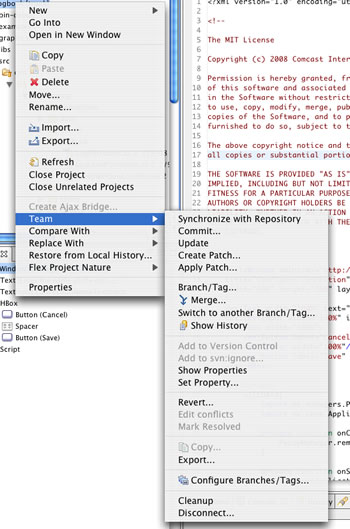
Working with patches is a new thing for me and I just wanted to blog about this quick. Working within Flex Builder 3 and with the Subclipse plugin installed, creating patches is as easy as right clicking on the source project and selecting Team > Create Patch … .This creates a patch file that basically documents the difference between the committed project and the user’s local files. The developer then sends me the patch file.
Patch Menu on Subclipse

There is a bug in Subclipse that puts absolute paths to local files rather than relative paths and since a developers local file paths may not be the same as mine, we cannot use Subclipse’s apply patch feature out of the box. To apply the patch, making sure I have no local changes in the project, I navigate to the project within my filesystem using the terminal. Once there, I apply the patch by typing

patch -pNumber-of-directories-to-get-to-project < path-to-patch-file

the -pNumber-of-directories-to-get-to-project parameter is basically to remove the folder references to the project directory in the patch file. So for example, if you open a patch file and the first line references the project root as

/Users/comcast/Documents/workspace/cimlogbook/src/LogBook.mxml

you would use -p6 . This removes the /Users/comcast/Documents/workspace/ reference. Once the patch is applied, refresh your project within Flex Builder and you will get the uncommitted changes icon on the changed files/folders. You can synchronize with the repository to see what changed, build the application to make sure it compiles, and then if everything looks good, commit the code to the version control system.

Special thanks to Mat Schaffer for getting me working with patches. I really like this way of committing code since it makes me feel a lot more confident around the libraries I am supposed to be responsible for.

UPDATE:
Another useful tip: Use SVN to generate change logs that can then be published, example:

svn log --revision 217:239 -v

Photowall: Scroll based data prefetch

Photowall is part 1 of a secret project I am working on (secret only since I am not sure part 2 will work, so I’d rather not declare yet what its about 😉 ). This component on its own is an exercise in data-prefetch. The idea is to load data as the user scrolls to the end of the current set rather than ask the user to click on a “more photos” link. In this case, the component is feeding off Flickr data.

Type in a search word inside the text input and hit enter. Once the first set of data has loaded in, use the scrubber below the photos to scrub through the photos. Note: Data prefetch is triggered on mouse-up rather than mouse-move, I need to implement that in the final version.

/blog/swf/Photowall.swf

Under the hood, I have a class called PagedDataService that computes which page of the remote data the user is on (Flickr apis support paged data, with each call out asking for a certain number of photos and a page offset, so page 1 has 0 to 1 x pagesize photos, page has 2 x pagesize, etc. Right now my pagesize is 60. ). The code also uses a PagePolicy class that the container looks at to see when the more data should be fetched. For example, in this case, I have asked the container to get more photos when the user is about 18 photos (6 columns) away from the last photo in the set.

There is no optimization of the code here yet, so I am not managing the photo renderers that aren’t visible to the user (which would free up memory). Another optimization would be to reuse renderers rather than create new ones like I do for every photo. Finally, a priority queue for the load requests would be great here.

So much for part 1, on to part 2. Stay tuned :).

Comcast Interactive Media’s Flash/Flex Team is blogging…

2008 began with on a great note for CIM. For the last few months a group of developers here, myself included, have been trying to be a little more vocal and public about the stuff we do and how we do it. I have done it on this blog a bit with entries on how we adopted Flex to build the next generation of video experiences on Comcast.net. But as of this Jan 1, CIM officially has developer blogs (applauuaseeee). The Flash team’s blog is available at http://teamcim.comcast.net/team/flash. Stay tuned as we start talking about the Fan, which I think is one of the most complex Flex applications out there, as well as our in-house tools that we are going to release under open source.
Suggestions are welcome either as comments on this post or the one at Flash Team Blog

I am Tumbling …

A few months back I was introduced to something called Tumblr by Mat, a friend and fellow developer at Comcast Interactive Media. For the uninitiated, Tumblr is a microblogging platform, kind of like twitter except you aren’t posting what exactly you are doing but rather links, photos, videos etc with minimal to none commentary . Here is a how wikipedia defines Tumblelogging:

A tumblelog (or tlog) is a variation of a blog that favors short-form, mixed-media posts over the longer editorial posts frequently associated with blogging. Common post formats found on tumblelogs include links, photos, quotes, dialogues, and video. Unlike blogs, this format is frequently used to share the author’s creations, discoveries, or experiences without providing much (or any) commentary.

source: http://en.wikipedia.org/wiki/Tumblr

The first time I saw it, I didnt really care for it. My blog is a pretty good outlet for most of my thoughts and ideas. I love posting code and observations and seeing comment on the posts. I didnt really get microblogging at all. However, its something I have slipped into slowly and steadily in the last few months, starting with being a little more regular on Twitter and now Tumblr.

So what got me into Tumblr? Instant photo-posts from my iphone was one. Tumblr (at least the service at http://www.tumblr.com) gives you an email address to send photos to that instantly (or with some acceptable delay) get on your tumblelog. However now that I have started using it, I find posting quotes or excerpts and images from blogs/websites most interesting. None of these ever justified a complete blog post, but are definitely Tumble-worthy.

I havent seen Tumblr on any of the blogs I visit so I am not sure how many people use it, but its something I would recommend a try at least. Its fun ;).

Link: http://arpit.tumblr.com

Adobe.com: Left anchored design is fashionable again?

By now pretty much everyone into adobe technologies knows the adobe.com site design changed today. Most of the blogs I have read have said it looks great and I do like the look for the most part. What I dont get is why the site is anchored to the left. There used to be a time when that was how sites looked, but that used to be mostly since most users were on 800×600 resolution so you designed your site to that width. In the new world where 1024px is the more standard width, forget the fact that most adobe product users are designers with much bigger and wider monitors, the left anchored design seems an interesting choice. Adobe’s previously launched XD site also had the content anchored to the left with user comments on the right. Maybe adobe.com will go that route too, recycling the white space for user comments or something?