
I am drooling already…Check it out here.
Flex optimization tip: ArrayCollection.removeAll() vs. ArrayCollection.source = new Array(). Is this a bug ?
One of the bugs reported on our recently released LogBook application was around the “Clear Logs” button. Within LogBook, we keep all the LogMessage messages in an ArrayCollection. When Clear Logs was clicked, we called a removeAll() function to clear the ArrayCollection. However when the size of the ArrayCollection grew more than a hundred or so, the clear command took a while and the whole application would freeze for a few seconds. A quick change of that to ArrayCollection.source = new Array() fixed the performance immediately. Interesting.
Looking deeper into the removeAll function and following the hierarchy to the ArrayList class, I saw that the removeAll loops through the entire source array, looking at each member to see if its an event dispatcher and if so calling a function to remove the propertyChange listener. Confused a bit, I posted a message on flexcoders to see why this was the case. Alex Harui from Adobe resonded with this:
Our code has to look like that otherwise if someone kept a reference to one of the objects that got removed, it would keep the ArrayList from being GC’d. We added listeners, so we should remove them. If the data objects are going away too, then you can probably reset the source, but if you see a memory leak later, I’d definitely check in that area.
Makes sense, but only kind of since the way the eventlistener was added was with the weak keys flag turned on, which means that I did reset the array, even if the old LogMessage objects were in memory, the garbage collector could still get rid of them whenever it ran. So I responded to Alex so:
Hmm, maybe I am missing something here? The only place I see addEventListener being called is
protected function startTrackUpdates(item:Object):void
{
if (item && (item is IEventDispatcher))
{
IEventDispatcher(item).addEventListener(
PropertyChangeEvent.PROPERTY_CHANGE,
itemUpdateHandler, false, 0, true);
}
}which has the weak-keys boolean flag turned on. Shouldnt that allow garbage collection to run without explicitly calling removeEventListener ?
And Alex’s response:
Because of the way GC works, I still think it is best for us to remove the listeners. GC is only on allocation so again, if someone had a handle to an object that got removed and twiddled a value, the notification code would run needlessly until GC kicked in.
However, I think you’ve come up with a great optimization for folks who know they are destroying everything all at once.
So the final verdict: If you are destroying all the objects within the Arraycollection, use ArrayCollection.source = new Array() instead of ArrayCollection.removeAll(). Calling removeAll() on large ArrayCollections seems to be a really heavy operation and could kill responsiveness of the app.
I do feel that this is a bug and not a simple optimization. Here is the final email I sent to flexcoders a couple of minutes back:
Hi Alex,
Thanks for responding. Should this be tracked as a bug? I think there may be a better way of handling this:
On removeAll() you can set a flag like removeEventListenersPending = true, copy the old elements to a temporary new array and run through the it in smaller sized increments (removing event listeners from say 40 objects every enterframe using something like calllater). In the meanwhile if a property change event is fired, you can see if the flag is set and if so make sure the item is in the current source array and not the temp array. When all objects in the temp have had their event listeners removed, set the removeEventListenersPending = false.
I think the current implementation may be causing a lot of performace issues since a lot of people may be using ArrayCollections for large data sets (thats what Flex is great for 🙂 ) and may not know of the penalty of the removeAll().
If anyone has any opinions, please feel free to comment. Okay, back to real work :).
Released: LogBook, An Open Source AIR based Flex Logging Application
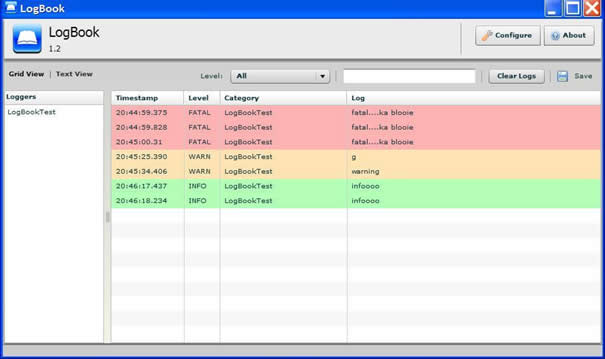
As promised, today we are formally releasing LogBook, our internally developed tool for logging events from Flex (and coming very soon, pure Flash AS2/AS3) applications. For the uninitiated, logging is the process of recording and storing information about events in your application. The functionality is similar to the trace command, but a lot more robust. Logging combined with a strong log viewer like LogBook gives you a much deeper understanding of the state of your application.
Some quick notes on LogBook:
1) LogBook is being released under the MIT open source license.
2) A detailed post on its features and how to use it is here at the CIM Flash Team Blog.
3) The code for LogBook is being hosted at http://cimlogbook.googlecode.com/.
4) We have also set up a Google group for logbook that we can use to discuss features that we should add in upcoming releases and bugfixes/patches.
5) The installer can be found in the downloads section there.
6) LogBook runs on the AIR beta 3 runtime.
At CIM we already have a list of features we are going to release in the next build. But of course if you have any feature you would like to request, please drop us a mail at cimlogbook@googlegroups.com. We are really hoping LogBook 1.2 is the first step towards a robust Flex/Flash development/debugging toolset.
Happy debugging :).
Releasing tomorrow: LogBook, an open source AIR based Flex logging application
The team at Comcast Interactive Media is putting the final touches to an internally developed tool we use for logging events from Flex applications. The application is built on top of the Flex framework and runs as an installable AIR application. Best of all, we will be releasing it under the MIT open source license. A much more detailed blog entry about logbook’s features will be published soon but here is a quick screengrab of the application (click to open in a new window):

Stay tuned ;).
Update: LogBook has been released and can now be downloaded at http://code.google.com/p/cimlogbook/
E4X parsing caveat: Watchout for the Firefox-hidden Namespaces
A friend of mine was having issues with parsing an xml file using E4X today. We were trying parsing an XML file generated by a webservice and for all he tried, the nodes were completely inaccessible to his code. Viewing the XML in Firefox didn’t give any clues and everything should have worked. I have debugged exactly the same thing before so I was able to help but since I have seen developers do this more than a couple of times, I thought I should mention this: Loading an XML file within Firefox hides all Namespace declarations. To actually see the document as its coming in, view source on the document and all namespaces will be seen there.
The document he was parsing turned out to have a default namespace declaration in the root tag which means all the nodes were in that Namespace. The root tag of the xml document looked like:
[xml]
[/xml]
Here is the code to actually parse such a document:
[AS]
var u:URLLoader = new URLLoader();
u.addEventListener(Event.COMPLETE, onLoadComplete);
u.load(new URLRequest(“document.xml”));
function onLoadComplete(event:Event):void{
XML.ignoreWhitespace = true;
var x:XML = XML(event.target.data);
var ns = x.namespace();
trace(“node value: “+x.ns::node1.ns::node2);
}
[/AS]
Note the ‘ns:: … ‘ prefix to the node-names you are trying to reach.
Hope this helps :).
More links on E4X and Flash:
Referencing ActionScript Reserved Words in E4X
Parse a document with namespaced nodes and a variable to be evaluated
Sneak Peek: Fan 4.2
A new blog post on the CIM Flex developer group blog talks about some of the new features coming out in the next release of the Flex based player. Check it out here.
Creating custom List renderers, the complete guide (Part II)
Continuing from the last post, this entry just adds a few more tips for working with List controls.
Creating RollOver/hit states:
In the last entry I had shown how to create custom renderers that respected their position in the List. The next thing you will probably need to do is create custom rollover effects. One way to do is to add event listeners to Mouse Events in your renderer. However there is a better way. Since your renderer is aware of the List it is a part of, you can modify your updateDisplayList function with the following snippet:
[AS]
if(this.owner as List &&
((this.owner as List).isItemHighlighted(this._data)){
// instructions on how to draw out the over state
}
[/AS]
It should be noted that this function will only work if the useRollOver is set to true and will not be executed otherwise. Once again this lets you create renderers whose behavior can be controlled by the List settings.
To create a hit state, you can use the isItemSelected() method the same way.
Attaching your renderer via actionscript:
The final tip I would like to mention is the way you can attach your renderer using actionscript. This technique is more useful if you want to create a list with multiple views, for example a simple text, image+text and just image view of some kind of data. The first time I implemented this was by creating two Lists and switching between them. A better way is to switch item renderers via actionscript. To do this we must remember that Lists use a ClassFactory to generate new item renderers as needed. So assigning the renderer to the list is as easy as shown:
[AS]
list.itemRenderer = new ClassFactory(YourCustomRendererClass);
[/AS]
Thats it. Hopefully these 5 tips will help you create lighter item renderers and get better performance off your Lists.
Creating custom List renderers, the complete guide (Part I)
If you are a Flex developer, one of the Flex components you will work on quite a bit is the Flex List control. This entry will hopefully help you when creating custom List renderers the (hopefully) right and much lighter way. Almost all the Flex applications I work on require a List thats skinned a little differently and display more information than that could be represented by a label value.
You can see the not-so-glorious example here and check the source here
There are quite a number of examples on the web on creating the a custom renderer for a List control. Very simply, a custom renderer can be used as a List renderer by calling it as below:
[xml]
[/xml]
So thats simple enough. However most of the code I have seen that is used to create custom renderers starts with a parent Canvas tag or some other container. This works for the most part and hides some of the complexity of creating custom renderers, however Canvas and other containers are pretty heavy objects to have a lot of in memory, especially when you are using a bunch of lists in the application. We ran into this issue on the Fan for example when we played fullscreen video without destroying our multiple List instances. As you can see in the image below, the Fan uses three Lists and one TileList in the square view. So at any point we could have close to 40 renderers displaying data.

So how do you create lighter renderers? well here’s how:
1) Implement IListItemRenderer:
Lists expect the renderers to implement the IListItemRenderer interface. Conveniently, the UIComponent class implements most of the methods mandated by the interface (I will not go into my ‘God Object’ rant about the UIComponent class here). The only method you *have* to implement is the get/set data functions to make it compliant with the IDataRenderer interface that IListItemRenderer extends.
2) Implement IDropInListItemRenderer:
So now you have a List renderer that works for the most part. You may consider leaving it at this point but you are still missing some magic. For one thing, your renderer isn’t really aware of its position, etc in the List. To get that info, your renderer must implement the IDropInListItemRenderer interface which forces another couple of getters and setters: those for accepting the BaseListData object. When the List creates instances of your custom renderer and when it swaps data in and out of your renderer, it will pass it the BaseListData object. This object will tell your renderer its row/column index and its the owner List object. So now your renderer is much more aware of its position in the world.
3) Create UITextFields:
Most Lists have textual data that they represent. Text and Label components would seem to be the obvious choice for showing that data. However, these are much heavy objects again. UIComponents, unlike containers, have no qualms about what kind of children they can add to their displaylist (Containers only let classes extending UIComponent to be added to them. Sprites etc can only be added to their rawChildren list). So you can very easily add simple native TextField instances and size them appropriately. However styling them is tedious. Instead, consider adding UITextField instances. These play nice with the Flex LayoutManager and can also use the CSS styles in the Flex app by just being assigned the styleName property.
4) Set styles:
Like HTML, its always a good idea to keep style declarations in external CSS files. These can usually be assigned to Flex controls by just setting their styleName property. For example you can create a Flex CSS file and create a unique identifier like this:
.myawesomelist{
alternatingItemColors:#cccccc, #dcdcdc;
}
To style a list with the styles you declare above, all you need to do is:
[xml] …. [/xml]
What is a less obvious is that you can create arbitrary values in the style declaration (These aren’t compiled to a packed actionscript object the way a class would be but more like a dynamic class would be). So in my earlier style declaration, I could just as easily add:
.myawesomelist{
alternatingItemColors:#cccccc, #dcdcdc;
myawesometextstyleName:’jazzytext’;
}
A List by default would have no idea what to do with the myawesometextstyleName style value and would ignore it. However, the CSSStyleDeclaration object referenced by the List is passed by reference to the renderers as well. So in your updateDisplayList function, you can call getStyle(‘myawesometextstyleName’) and get the value declared there. Now by assigning the value to the UITextField, you can get the formatting you are looking for.
We still have some ways to go. The remaining stuff comes in next entry so stay tuned :).
Be careful with the new Flash Player 9.0.115.0 security changes.
I am surprised this isn’t talked about more in the blogosphere. The only reason I got to this was because a couple of my Flash applications broke this weekend and it took a lot of digging by quite a few of us on my team before we got to the root of the problem. So here is the deal: With all the goodies that have come with the latest Flash Player, one of the features that seems to have arrived is a stricter security model. There is a complete article on the updated security model can be found here on the Adobe Devnet site. A more bite sized sum-up of the article can be found here. As you see, the 2 big changes is the move to XML schemas rather than DTDs and a new site-control tag for meta-policies on crossdomain access.
Ah, so that’s breaking my app.
Well, not really. Before we updated our crossdomain.xml files, I just wanted to confirm that that was indeed the problem. So I enabled logging on my Flash Player (to see how to do that check the logging section on the article here). The log though surprised me. Here is what I saw (I have edited the site names where I was seeing the issues):
Error: [strict] Ignoring policy file at http://[site name]/crossdomain.xml due to missing Content-Type.  See http://www.adobe.com/go/strict_policy_files to fix this problem.

Error: Request for resource at http://[site name] by requestor from http://[swf url] is denied due to lack of policy file permissions.
Yikes. So seems the problem was that our server was not sending Content-Type headers for the xml files and the new Flash Player is a lot more strict about that, rejecting such crossdomain.xml files.
Hopefully this helps someone out there. If you do load data across domains, do verify they work on the new Flash Player.
[Update] Also check out the changes to authorization headers support for basic HTTP Auth:
http://kb.adobe.com/selfservice/viewContent.do?externalId=kb403184&sliceId=1
The funny things you see …
One of the funniest screen-grabs while debugging : link
 Code Zen