The grand 2010 recap post

Wow, cant believe its that time already.

2010 was a pretty great year for me. In Nov 2009 I moved to the User Experience team hoping to be the voice of technology as new projects were conceived and features enhanced. So the year began with me learning the workings of the UX team which was fascinating. The creative process is, not surprisingly, very different from the engineering one, and sitting in those sessions was ridiculously educational. CIM has some pretty fantastic Design and IA folks and I got to learn quite a bit on concepts such as Mental Models, Task oriented design, User Persona’s etc. I also ended up reading a few books on my new role (of which About Face might be the best one, and I recommend it strongly to anyone in the UX/UI domain) which I never would have done if I hadn’t moved to this team.

Suffice to say, if the year needed to be summarized in a word, it would be “educational” 🙂

Around Feb, I also got involved in a prototype for the project that is now the Xfinity iPad app. As a UX prototyper, I was on the 3 people big prototype team that built the demo that was shown at the NCTA event. After that I ended up working with the brand new Advanced Engineering Team as we rushed to get the final product out of the door. My role in the team was not UX really, but implementation. After the initial learning curve of Objective C, I got pretty comfortable with it and actually realized that user interface frameworks and technologies are pretty similar even with syntactical differences. I wrote about the whole Xfinity App development experience here. In the last few months, I have returned to prototyping but these days they have all been functional additions to the iPad app itself.

While I didn’t write as much code for it as the iPad, I have also become extremely passionate about the Android platform. While less polished than its i-Cousin, the deeper I look into the architecture the more awesome it seems. I built a couple of apps for internal demos that ran on Android (in Java) and that was fun. I feel less proficient in the Android UI framework than in UIKit, just by virtue of time spent developing on it, but its something I hope to get better at next year. The Android world definitely lacks the sexy factor that is going on with the iDevices, and I am really hoping that changes both with upcoming OS updates and developer community maturity. I also played around with AIR for Android a little and it seems pretty decent. I am working on a project using that now. The biggest thing that has going for it is not just the familiarity of ActionScript but also the tooling of the Flash IDE. As much flak as it gets, the Flash IDE is rather fantastic for dropping visual assets for an app. I really wish AIR for Android played nicer with the core Android framework, though there are ways of doing that as mentioned in this post by Elad Erom.

EspressoReader, my AIR app for consuming news (currently as a Google Reader client) continues to evolve. Just building something like that has made me learn so much about the way we consume information. It has also gotten me hooked on books on collective intelligence and text analysis. I will release a new version in the coming weeks that I am really excited about. So if you haven’t tried the app out yet, give it a try by installing it from this link to the Adobe AIR Marketplace.

I ended up travelling for work quite a bit this year, attending some pretty fantastic conferences like the NCTA Cable Show, the Web 2.0 Summit and TechCrunch Disrupt. This is a change for me, as these were more about the business and strategy than my usual fare of tech conferences. From my schedule in Jan, looks like this will continue. Btw, I am heading over to CES so if you are heading there as well, send me a holler 🙂

Finally, looking ahead, 2011 seems to be at a great start. There are a lot of changes afoot which I’d love to share soon. So stay tuned 🙂

Some interesting videos on alternate/future Android UIs

I love Android, I really do. Probably more so for geeky developer-y reasons than anything else. I love the application architectural concepts of Activities and Content Providers that can be mixed and matched to form a complete experience, as well as the fact that it supports true multi-tasking, not the pseudo multi-tasking that iOS supports (its shocking how many apps actually cannot handle multitasking on my iPad with the OS 4 update). But its no secret that the Android UI is awful! I hope the 2.3 Gingerbread update fixes some of these but my hopes aren’t that high (its a point release after all and considering how much of the UI needs to be changed from ground up, I can’t imagine a lot has changed there)

But recently I found some rather interesting videos on Android UIs so I thought I’d add them here so that I can always find them, and hopefully inspire some Android devs to look beyond the built in widgets:

The following videos come from the ReadWriteWeb blogpost

Here is another awesome Android MOD called MIUI for rooted Android phones which brings a much more polished UI to the Android that I discovered from this link:

I’ll add more videos here if I find any but I definitely hope people start being more creative about the UI on the Android devices.

[Update]
Some of the ideas mentioned above are also reflected in the TSF Shell Launcher app

Xfinity TV App is finally in the App Store

Its pretty awesome when the project you have been working on for so long is finally released. Last week, the Xfinity TV App was finally available on the Apple App Store, and has been in the top 10 most downloaded apps for the iPad pretty much since then. The app is a free app and is pretty fantastic, turning your iPad, iPhone and iTouch into a virtual remote control for controlling your Comcast Xfinity Cable box.

If you haven’t used it yet, here is a video walkthrough of the app in all its glory:

Building the app was a huge learning experience for me. Before this project I knew very little about iOS and Objective C, but working with some of the smartest developers on the platform got me to learn iOS app development pretty fast. At this point, I have worked with so many UI technologies and frameworks that I was able to apply a lot of my learnings almost directly (with syntax differences of course). For example, one feature I was responsible for was the OnDemand listings view in the app. To implement the view that was supposed to show the thousands of assets available on Xfinity, I was able to implement a virtualized list that recycles item renderers to effectively manage memory. The api and implementation of my component was very influenced by the Flex and OpenPyro List control (I have previously discussed virtualized list implementation in ActionScript here).

Btw, I have to say, if you are just getting started with iOS, the Stanford University video series on iPhone app development is a great place to start.

The Team

IPad Dev Team

Building the app was quite a fantastic (even if extremely hectic) experience, but I have to say the best part was working with an awesome team. The app definitely had us working late nights on multiple occasions but thats a lot more manageable when you work with people you actually enjoy hanging around. The picture below is the app team but behind the scenes there was a huge number of engineers across the country that handled the network and set-top box updates that allowed the app to work.

The video below has Sean Brown (Sr Director of the Advanced Applications Engineering team) talk about the development process of the app. The video occasionally switches to the co-working space that is set up where Engineering, User Experience and QA teams work together.

The Response

… has been fantastic and thats amazingly gratifying. I have embedded some of the Tweets I just found doing a twitter search for “XFinity Remote”, and its awesome to see how people react to it:

//

For more formal reviews, check out some of the posts mentioned below:

As awesome as the app is, there is a lot more features that are being added to it now. Recently we demo-ed the PlayNow functionality thats being added to the app for an upcoming release at the Web 2.0 Summit. Embedded below Neil Smit, President of Comcast, giving a walkthrough of that version at the event:

If you want to keep up with app updates etc, feel free to follow XfinityTV App on Twitter. Also if you are an Android user (like I am) rest assured that the Android version is well on its way :).

An OPML like exportable format for Todo Lists?

Another month, another Todo list app tried and given up on. The latest candidate is The Hit List, a beautifully designed Mac application. However, it lacks any online component and as I move between different machines, the lack of being able to add/remove items from some web interface finally got to me. Pretty sad, since I really liked the interface.

I have now lost track of the number of Todo lists I have tried. I liked different ones for different reasons. For example:

  • GMail tasks: is awesome because its right there within GMail where I go multiple times a day
  • Remember the milk: I love the simple natural language way you can add tasks
  • The Hit List: Really polished UI
  • Epic Win: Completely useless as a todo list app but really fun to use 😉
  • Teux Deux: Elegant design, iPhone app is a plus (well not anymore since I moved to Android)

While todo lists like the ones mentioned above are cited frequently, I feel enterprise project management and issue tracking solutions are little more than glorified todo lists are they? Working at Comcast. I have gone through quite a few of them, like Trac, RedMine or Rally.

So why isn’t there an OPML like exportable format for todo lists? I jump between todo list apps much more frequently than my feed readers and from what I read, so do most people.

Since most todo lists seem to always work with the same data an exportable/importable specification to define them would reduce the friction of trying out a particular tool a lot. Moreover, an agreed to format would also allow interoperability. For example, at work while we are all mandated to use the same “enterprise app” to manage the work, its conceivable that you could work with the same server while choosing different clients.

I imagine a spec like this to define todo lists:

This is of course completely not thought through completely, so I am sure there could be other items that would need to be represented, but hey, its a first stab.

For extra points if we could define an RSS-like spec for tasks that would be even better. That way clients could subscribe to tasks from services like mentioned above. If you are developing a better UI for task management, you could just build the UI part and leave the data management to some other service.

Notes on Game Mechanics

The recent explosion of “game based” apps out has led me to read quite a bit about the topic. Here are some notes on books, articles and presentations I have been reading:

Some Rules for Game-Based Systems (from the book Game Based Marketing):

  • Favor long term loyalty not short term competitions
  • Dont offer direct prizes, offer virtual points. Real world value of virtual points can be tweaked at the time of redemption.
  • Virtual points can also be used for virtual goods. Virtual Goods Economy is 5.5 Billion Dollars
  • Does redemption matter? Huge number of points are almost never redeemed
  • Top 5% of airline customers generate 40% of the revenue
  • Create opportunities for elite members to show their eliteness (like lounges in Airports open only to elite members)
  • Create artificial scarcity and rewards around it.
  • First reward should be soon
  • Casino style *random* rewards create short cycle reinforcement
  • Need both long term goals (level ups) and short term (mini games/challenges)
  • All game based systems need:
    • Large community
    • Point System
    • Simple Communication platform

Types of Players (from the book Game Based Marketing):

Four Player types based on motivation:
Achievers
Go to great lengths to get rewards
Dont care for winning in a vacuum: need an audience (leaderboards)
Need the Socializer
Socializer:
Want to build meaningful interactions
Often are more about helping others win rather than winning themselves
Explorers:
Need rich virtual worlds to explore
Love to share detailed accounts of their explorations
Long games with repeated actions bore them
Killers:
Need simulated win & lose conditions
** The Naive Player **
Fairly unaware
Need to be made aware that a game is going on
  • Achievers
    • Go to great lengths to get rewards
    • Dont care for winning in a vacuum: need an audience (leaderboards)
    • Need the Socializer
  • Socializer:
    • Want to build meaningful interactions
    • Often are more about helping others win rather than winning themselves
  • Explorers:
    • Need rich virtual worlds to explore
    • Love to share detailed accounts of their explorations
    • Long games with repeated actions bore them
  • Killers:
    • Need simulated win & lose conditions
  • The Naive Player
    • Fairly unaware
    • Need to be made aware that a game is going on

A really awesome presentation on the shallow game design that seems to be creeping into web properties by Sebastian Deterding

“Yet when I look at most gamified applications today what they do is use game elements to tie us even more tightly into our worldly toils and schemes. They are glorified report cards that turn games into work rather than life into play, and users into pawns instead of players”

Pawned. Gamification and Its Discontents

The secret to Farmville’s popularity is neither gameplay nor aesthetics. Farmville is popular because in entangles users in a web of social obligations. When users log into Facebook, they are reminded that their neighbors have sent them gifts, posted bonuses on their walls, and helped with each others’ farms. In turn, they are obligated to return the courtesies.

  • Farmville is defined by obligation, routine, and responsibility;
  • Farmville encroaches and depends upon real life, and is never entirely separate from it;
  • Farmville is always certain in outcome, and involves neither chance nor skill;
  • Farmville is a productive activity, in that it adds to the social capital upon which Facebook and Zynga depend for their wealth;
  • Farmville is governed not by rules, but by habits, and simple cause-and-effect;
  • Farmville is not make-believe, in that it requires neither immersion nor suspension of disbelief

Other links:

On User notifications: Alert, Notify, Acknowledge

In any client-side application of reasonable complexity there is a lot going on. There are numerous moments during its lifespan where it might want to communicate to the user of different events: errors, underlying data changes, etc etc. While coding an application, its very convenient to just use the native “Alert” implementation to inform the user of some change in the application state. Every UI framework supports it, and in some cases like the iOS UIKit, it doesn’t look awful almost leading you think it may not be a bad idea.

Unlike people though, all user notifications aren’t made equal. Alerts demand immediate attention (in the case of JavaScript, they stop the entire GUI thread freezing the application, though thats not the case in other UI technologies). Recently I wanted to get rid of the Alert windows I had placed in my rush to get EspressoReader out of the door, and started looking at different notification paradigms out there.

One concept I wanted to borrow from was application logging frameworks like Log4J. Logging frameworks usually define a series of levels that you can use to define the priority of your message, for example in the case of Log4J the levels are:

  1. Debug
  2. Info
  3. Warn
  4. Error
  5. Fatal

While tempting, these dont really map to any order of priority for end user notifications. Looking around the web though,  I did see some interesting ideas around notifications. For example, XUL (Firefox’s UI framework) includes a NotificationBox control:

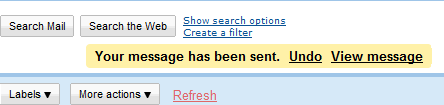
This system seems to be getting pretty popular now, with the Chrome browser UI framework including something similar to that as well. Gmail notifications are in the same vein:

The thing with GMail notifications is that they are closer to the actual interaction that prompted the notification which works well (Fitt’s law in action!)

I guess this system is slowly becoming standard. I really wish “notify” was a built in function in JavaScript similar to “alert” but at least there is a jQuery plugin that seems to add that functionality now.

Another interesting notification system is the fading message box like discussed here, or more famously, as shown by Growl

However, the problem with such notifications is that they are pretty transient (generally fade out), which is often not what you want. I couldn’t really find an official name for these so I call them “acknowledge boxes”. On the importance scale, these seem to the ones with least importance. Another acknowledge notification is an audio clip played when an action is performed, though those need to be used with caution since they get annoying pretty soon.

So here is my sorted list of prioritized notification UIs:

  1. Alert: Most severe, “deal with me now” kind of messages
  2. Notify: Hey something happened. Finish whatever you are doing and then let me know
  3. Acknowledge: Least important “I heard you” kind of messages

If you have any other interesting notification user interface examples, please share them here.

[Video] New Magazine View in EspressoReader: Your Google Reader feeds never looked so pretty

I am pretty proud of the new version of EspressoReader that was released yesterday. While the build included numerous bugfixes, the biggest change in the app is a much improved Magazine View that is centered around the images in a feed. Here is a screenshot +video of the new view:

Magazine View

The view is fully navigable via the keyboard via the directional keys which makes going through a bunch of feed items really easy.  By the way, I will be releasing the core library that does the image fetching under an Open Source license in my next post so stay tuned for that. In the meanwhile, if you are a Google Reader user, go download EspressoReader from the AIR marketplace and give it a shot.

Android Tip: Managing podcasts using Google Listen and Reader

One of the best parts of moving to Android is getting away from iTunes. I have never been a fan of that software and it seems to be getting more and more bloated as time goes by. These days, all I need to do to move songs into my device is just connecting it via USB and dragging the songs into the mounted device.

There are things a few things I do miss about iTunes though. One of them is a subscribing to and managing podcasts. There are a few apps on the Android marketplace I guess but none seemed very good. Yesterday, though I gave Google Listen a try and I think its working out well.

Listen is an Android application released by Google Labs and as you can see from its homepage, it lets you find and subscribe to podcasts. However since it seems to be a fairly new project, the search index seems fairly small and I could only find a couple of podcasts that were interesting to me.

Whats interesting though is that Listen seems to use your Google Reader account to manage the subscriptions. So the podcasts that I had added to my account appeared under a folder named “Listen Subscriptions”. So just to test, I found the RSS feeds for a couple of subscriptions and added them into the same folder. Ta daaa! They immediately appeared in my “Listen” application on my Nexus One.

The coolest part is that the podcasts being managed by listen can actually be streamed to your device when you start listening to it, so no waiting for the download to complete and then sync to device before listening to em. Win!

On Ideas, implementation and iteration

I have way more ideas than I have the capacity to execute.

That seems not an uncommon issue among my friends, and unlike that saying about ideas, I actually dont think everyone has ideas. Or rather, not everyone is passionate about ideas or seeing them through to some kind of product/feature anyway (people often mistake opinions for ideas). But there are definitely a lot of idea people out there. And in today’s hyper connected world, this has enabled a slew of services ranging from idea gathering platforms like Uservoice, Kindling to complete “idea to product” services like Quirky to emerge. [Update: Wall Street Journal has a fantastic article on Ideas that you must read, also my friend Karl Martino has just published a post with 3 other links on ideas]

One thing I have come to agree with is the thought that ideas are merely multipliers of execution, i.e. ideas are great and everything but what really counts is the execution. Occasionally, when someone shares something interesting and someone dismisses it saying “Oh I had that idea a while back”, I wince. Its that kind of thinking that often leads to people posting stuff like this, feeling cheated of success that should have been theirs because they had the idea first.

Execution is everything.

Or is it? Yesterday I read a rather awesome post by Jeff Atwood on the growth of his company (Stack Overflow) and his continued belief in what he calls “Boyd’s Law of Iteration” based on the findings of USAF Colonel John Boyd:

Boyd decided that the primary determinant to winning dogfights was not observing, orienting, planning, or acting better. The primary determinant to winning dogfights was observing, orienting, planning, and acting faster. In other words, how quickly one could iterate.Speed of iteration, Boyd suggested, beats quality of iteration.

The same seems to be true of product development. Jeff references projects like Google’s Chrome and Android and how they are getting to be really successful because of their fast iteration cycles. The official Chromium blog recently published a post on the accelerated release schedules and further mention their three goals for the accelerated releases:

  • Shorten the release cycle and still get great features in front of users when they are ready
  • Make the schedule more predictable and easier to scope
  • Reduce the pressure on engineering to “make” a release

Over the last few years, I have released quite a few projects including:

  • FlexAmp: An online mp3 player that plays audio from an online storage system like Box.net (now broken)
  • DiggGraphr: A treemap visualizer for Digg stories (now broken)
  • EspressoReader: A desktop client for Google Reader

A huge personal milestone for me was EspressoReader’s second feature release. I realized that of all my projects (not including open source libraries like OpenPyro of course), Espresso was the only project that ever had a second iteration that actually evolved the app (my other projects have had maybe one or two minor updates for bugfixes). The funny thing is, I have a lot of personal notes on features for v2 of all of  them.

So here is why I think a lot of my projects never have a significant version 2:

  • The developer itch is gone: I started a project because I was interested in a platform or an API and the part I was curious about is gone.
  • The last 10% sucks: I realize that there are so many edge cases to consider. The app is very demoable but isnt at a point where anyone can actually use it for long without hitting a bug
  • The damn codebase is a mess: To get to the part where the app proves the concept, I have taken shortcuts that have compounded on each other. So now there is a lot of work involved to get the app to a state where it has the same functionality as before but I don’t groan every time I open the project’s source.
  • There is a shiny new toy to play with: These days its iOS and Android, both platforms I am interested in and spend enough time between 9-5 on to be able to take on a project involving em (well more iOS than Android as of now). Its really hard to stay focussed on a platform that is not the shiny new thing.

I hope as I mature as a programmer, I can curb my tendencies to jump off of projects for the above reasons. All I can tell you right now is that there is definitely at least a third version of EspressoReader coming out in the next few days :).

Mark Zukerberg on Social Applications

Techcrunch has a pretty fantastic interview with Mark Zukerberg, CEO and Co-Founder of Facebook. While the whole interview is definitely worth the read, the following part resonated strongly with me:

One thing that I think is really important that I think is context for this, is that I generally think that most other companies now are undervaluing how important social integration is. Right, so even the companies that are starting to come around to thinking, “oh maybe we should do some social stuff”, I still think a lot of them are only thinking about it on a surface layer, where it’s like “OK, I have my product, maybe I’ll add two or three social features and we’ll check that box”. That’s not what social is. Social – You have to design it in from the ground up.

Off late the “social integration” tier of a lot of the new services tends to be “publish this activity to Twitter or Facebook”, and that gets old really fast. Its why I have updates from services like FourSquare set to be filtered out of my Twitter stream. Thankfully Tweetdeck makes it really easy.