Thoughts on inter-app communication and Siri-izing Android apps

Coming from developing iOS applications, the concept that struck me most interesting in Android app development was the way it handled inter-app communications. For the uninitiated, here is a simple way to understand how Android apps work:

  • Each Android app is composed of a few different parts: Activities, Services, ContentProviders and BroadcastRecievers
  • An Activity represents a single screen with a user interface. They usually constitute one complete “action”, like signing up or updating a status or something like that.
  • Users transition between Activity screens while performing a task. This is made possible by the Activity sending asynchronous messages called Intents to the Android system
  • Intents trigger the next appropriate activity. So, for example, a clicking on the share button sends a  Share Intent to the system that then pulls the appropriate share activity.
  • Activities from different installed applications can be mixed and matched to allow the user to complete a task. In the case of “Share” for example, apps like Tweetdeck or Facebook add the appropriate Share Activities so that the user may pick the one that he actually cares about.

The last point makes for very interesting scenarios. This means that app developers can relegate certain responsibilities to other apps the user may have installed. This is also what allows users to switch out the default apps with others. Prefer the new Firefox browser to the default Android one? Well, check off the box that always resolves the browser intent (or specifically the ACTION_VIEW intent) and now you’ll never see the native browser again. While the core Android intents are decently documented, there are even efforts on like OpenIntents.org that try to provide a central location for information on intents offered by third party applications.

When I first saw the Apple Reminders app introduced at the iOS5 keynote, it made no sense to me. Why build a mediocre reminders app when the iOS AppStore is full of really well done todo apps? It wasn’t until I saw Siri at the 4S launch keynote did that click: Reminders is the perfect use case for voice recognition and they needed an app to respond to the Siri “add reminder” trigger. Since then, I have seen a lot of developers get hopeful about when Apple will allow third party apps to be Siri-enabled, but I have a hard time figuring out how exactly that would work. In Android I imagine a central app that dispatches custom Intents like a system wide “Reminder” intent or other custom events that multiple apps can wait on, but I dont think any such concept exists in iOS at least today (hmm, the more I think, it probably could work using something like UIApplicationDelegate’s openURL method and a custom URL Scheme)

The video below by the folks at Remember the Milk showed how to add events to their app via Siri, but if the instructions are anything to go by, its a pretty smart hack but a hack nonetheless. Also I am not sure in this case if your tasks are being pushed to both RTM and Apple Reminders and if they are, I doubt the “done” action is synchronized as well.

Compare that with the second video here done by me using Vlingo, an off the shelf Android personal assistant app (very similar to Siri and surprisingly decent). The video below triggers the “Share” intent at which point I can pick any app from my list of installed apps that respond to that intent. Note that I could have also checked the checkbox there to always go to Remember The Milk (actually my preferred todo app right now is Astrid) but its pretty cool to see that not only did the task successfully get added but so did the day (“Tomorrow”) which is a separate form element in the “Add Task” Activity.

This kind of inter-app play makes for some very interesting possibilities. Its unfortunate that Apple seems to be going the exact opposite direction with apps on their platform. Apps on iOS are already pretty isolated from one another but now those rules are also going to be set on desktop software: a place where it makes even less sense.

On the flip side there are also projects that want to extend the concept of intents to the entire web. If you haven’t seen it yet, check out WebIntents.org. I am pretty excited about this, hopefully this makes it. It looks like both Chrome and Firefox at least are looking to support that kind of mechanism for inter app communication.

Update/epilogue:
I first got really interested in inter app communications when I was playing around with Macromedia Central back in the day. Central was Macromedia’s first try at Flash based desktop apps and never really made out of the developer preview, but it had some great ideas on inter-app communication.

Here is a snippet from their whitepaper on Central:

Hey Adobe, can we get this back in a future version of AIR?

Doodler

I am a chronic doodler, and have always struggled to keep my notebooks clear of doodles and seem more “information heavy”. So watching this video was quite an eye opener:

http://video.ted.com/assets/player/swf/EmbedPlayer.swf

Another link from Time here goes deeper into a study that shows how doodling actually helps you pay attention!

If you really enjoy doodling, I strongly recommend Doodler’s Anonymous, pretty much the definitive blog on doodling. Their post on Netflix Envelope Doodles is just amazing and on my permanent list on links for when I need some creative inspiration.


Netflix Envelope Doodles“This movie sucked.” – is my favorite. I’ll draw something up and add to this fun collection. I like Jovino’s robot too. Reminds me of a killer cyborg version of a British postbox! 😀 I wonder what would happen if an envelope was to be intentionally placed where a phone-doodler could find it and absentmindedly cover it up with subconscious doodles…

Embedly Powered


Pity the doodle.com domain is owned by a web app that has nothing to do with doodling in the artistic sense (but still a fantastic app that I use quite often). Would love to see Quasimondo’s ScribberToo app there 🙂

Its comments like these …

…that keep me working on EspressoReader

I know this video was posted a year back. Could not stop myself from praising about your marvelous work. Really made my Google Reader mess an enjoyable read.
Thanks and congrats for the awesome piece of software 🙂

On the first “sneak peek” video of EspressoReader posted July of last year. Wow cant believe its been that long already. Since then it has had about 5 releases with feature updates and yet that pipeline never seems to get emptier 😉

The wrong metrics

The world lost a creative genius yesterday with the passing of Steve Jobs. While there have already been a number of posts on the web on his vision and creative leadership which is how most of us will remember him, it reminded me of how we often measure things in life. This post basically came out of some of those thoughts as well as a fantastic post today by Frank Eliason formerly of @comcastcares fame. One part that really resonated with me is quoted below:

People are focusing on the completely wrong metrics and not properly educating executives on the real story of social media. Today, companies are focusing on metrics such as ‘likes,’ fans, followers, etc. These metrics tell you nothing of substance … Most companies proclaim to be ‘listening’ in the space but very few have changed or implement processes or products based on this listening.

While the post is very specific about social media, I often feel surrounded by metrics that have very little meaning. Often these become goals rather than indicators of value. Developer conversations often revolve around lines of code and code coverage by unit tests and yet these metrics can often be meaningless (like having a 80% code coverage means little if the most fragile parts of the code are ignored). Product conversations revolve around “likes on a Facebook fan page” or “number of tweets” which drive decisions. Career successes are measured not by what we have grown to be able to do but by the title and position we have at the company.

A very common quote in the management is “you can’t manage what you don’t measure” and yet often in the zeal to measure things, we often forget the Observer Effect which, stated simply, says that the act of observing something changes the properties of what’s being observed.

The thing I admired most about Steve Jobs and Apple was their ability to build truly innovative products, of taking risks and going with the heart even when metrics didn’t really exist to predict if they would be successful.

Sometimes all it takes is working on things you feel passionate about.

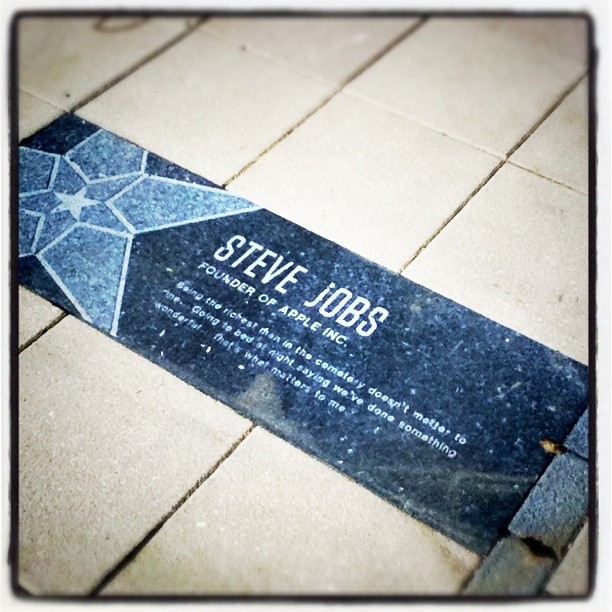
“Being the richest man in the cemetery doesn’t matter to me … Going to bed at night, saying we’ve done something wonderful… that’s what matters to me.” -Steve Jobs

On Better Printers

After another fairly annoying morning with my printer, I was reminded of this satirical post that the Onion ran on Tim Cook and Printers. The premise of this was basically that printers were as dull as a topic anyone could think of (basically emphasizing the difference between the creative Steve Jobs and the very operationally centric Tim Cook)

New Apple CEO Tim Cook: ‘I’m Thinking Printers’

SAN FRANCISCO-Following the resignation of Apple founder Steve Jobs, incoming CEO Tim Cook called a meeting of shareholders and members of the press Thursday morning to announce that he envisioned printers as the company’s future. “Laser, ink-jet, double-sided, color, black-and-white-the future of technology is in printers.
img

And yet I really do think printers need their “ipod” moment. We have for far too long been stuck with a purely utilitarian implementation that is a cause of frustration more often than not. Anyone remember this sketch by Eddie Izzard?

So I really like this printer concept that I saw last week. This may of course be overkill, but I can’t wait till I have a printer that actually is joyous to use.

Of course I feel the days of the printer may be numbered. I hardly ever use mine except to occasionally print boarding passes for the few airlines that dont yet generate emails with those as QR codes, but still if I do have to have one, I want one of those 🙂

Update:

Meanwhile there are folks at Bergcloud who are completely reimagining printers more as a toy.

Hello Little Printer, available 2012 from BERG on Vimeo.

Building TimePiece: My presentation from Philly Android Alliance this week

I gave a talk this week at the Philadelphia Android Alliance User Group on TimePiece, my open source Android World Clock app. We discussed some of the code and design patterns used in the application. Here is the slide deck from that presentation.

Thanks to everyone who came.

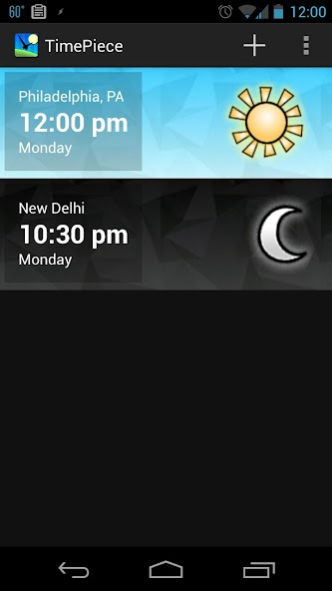
Introducing TimePiece, my first app on the Android Market

I am pretty excited to announce my first application is finally on the Android Market: TimePiece, a pretty little world time app (Go get it, its FREE!)

A couple of months back, after a series of disappointing searches on the Android Market, I started working on a World Clock app for Android phones. Most of the world time apps on the Market were functional but I really didn’t care for the design. The goal was to not only finally have an app I would like to use, but also really grok the Android framework. I had played with Android on and off for quite a bit while my day job remained developing iOS apps, but I figured nothing teaches you as much (by forcing you to deal with all the annoying details) like going all the way and publishing an application to the Market.

For bonus points, I have released the code for the application under the MIT Open Source License. So if you want to fork it, go for it. And if you see something you think can be done better, please let me know.

One thing I did want to ensure was that the app did not use any web API, and rather used locally stored data. This limitation forced the timeline of the project to exceed my personal deadline but I think it was worth it. The city data comes primarily from http://citytimezones.info/ but had to be massaged quite a bit to find the appropriate Java TimeZone IDs and then leverage the Joda Time library to show the correct times while respecting things like daylight savings times. The massaged data was stored in a local SQLite database that the app uses.

In the next few weeks I’ll talk about a few implementation details and my experience coming from the Flash / iOS world. In the meanwhile, if you have an Android phone, give it a shot and let me know what you think. Also please rate/comment on the app on the Market. I’d love to see the app actually be used :).

Some ideas for Google Circles

After playing with Google Circles for a couple of days, I really admire the feature. However there are still a couple of things I need in it:

Read items in overlapping Circles
Most of my Circles overlap. For example I have circles like “Philadelphians” and “friends”. I often add the same person to more than one circle, which is great. However this becomes a problem when the same updates resurface as I navigate between circles. Google Circles really needs a concept of “read” updates that need to go across circles.

Public Circles:
Another feature I would really like is the idea of creating a public circle around a topic and have people join in. In my case, I would love to create a circle around Android developers around Philadelphia since I help run the Philly Android Alliance User Group.

Smart Circles:
I’d also like circles to automatically filter all the content across Google Plus and return content based on my interests. This would an evolution of the sparks feature (which I don’t really use right now, since Twitter and RSS seem to do that job for me already). So as (public) links are shared on Google Plus, I’d like to see the people sharing it and the conversations around it.

Cross posting from Circles:
This is already a popular enough request I imagine, but I’d like to push an update I make to a specific Google Circle to my Twitter/Facebook/Linked In etc networks. So I’d like to create a circle named “to-twitter” who’s only job is to post the content to my Twitter account. This makes G-Circles my one destination to post content.

Thats some ideas I had, what do you guys think?

What other ideas do you have?

Slides from this week’s Android Alliance meeting: Investigating Design Patterns

This week’s design themed Android Alliance Philly meetup was a lot of fun. Here are my slides from my talk on Android UI design patterns:

Thanks everyone for coming 🙂

[Update] Other design resources:

Comcast shows off 1Gbps Broadband /Filed under I-did-this ;)

Am only now catching up on all the online news around the Gigabit broadband demo that Comcast CEO Brian Roberts showed off last week at NCTA. If you haven’t seen it yet, check out the video below (the video seeks to the point when he starts showing the 1 Gig prototype, though before that is the probably-cooler next gen Comcast set-top Box experience):

The demo was the end product of a LOT of work by a lot of folks and it was great to see it work without a hitch at the end. The videos downloader client itself was my responsibility and was written in Java Swing.

Here are some other links from around the web about the demo:

Also check out the official post on the Comcast demos at NCTA.

PS: This is the second demo I have worked on for NCTA, with the XFinityTV iPad app prototype last year. Looks like I am a veteran now ;).