Have you seen the XFinity Social Remote app?

I am a few days late posting about this, lets just say I have been catching up on sleep I had been deprived of for the last few weeks building this app. So in case you haven’t seen it yet, check out the video of the XFinity Social Remote, unveiled at the NCTA Cable Show Conference last week.

To read more about the app, see the official post on Comcast Voices on the app and its future.

More reviews:

Fantastic stuff 🙂

Reminder: Flex 4 and Flash Builder 4 Launch Event at Wharton this Wednesday

In case you haven’t heard already, this Wednesday (April 28th), the Philadelphia Adobe User Groups will be holding a joint event celebrating the release of the Flex 4 framework and Flash Builder 4 at the Wharton’s Jon M. Huntsman Hall, Room G65. We’ll have Terry Ryan, Flash Platform Evangelist for Adobe speaking at the occasion and there will be food and a bunch of giveaways. The event is jointly being organized by the Philadelphia Flex, Flash, ColdFusion, Photoshop and Illustrator User Groups so its a great opportunity to connect with other groups and group managers as well.

The event is free of course but you will need to register here. And if you are into Flex development, make sure you are on the PhFlex mailing list as well.

Hope to see you there!

Alright Adobe, here’s what you do: Cross compile Objective C to run on the Flash Player

Ooooh, I think this may actually be a good idea.

We know that Apple is trying to keep its developer base isolated from the rest of the mobile world. If you have to choose a platform between iPhone and Android, an indy developer will probably choose the iPhone right? Thats where the people are. This has nothing to do with the Flash Player, but everything to do with making the iPhone a hard ecosystem to leave for a user.

Now Adobe, imagine you release an Objective C library that developers can use that will also cross compile to Flash Player bytecode that can run on Android, web etc. You already have done some work for compiling C/C++ to Flash Player bytecode in the Alchemy Project, and I am assuming you now have a bunch of of LLVM experts in your team. You will have to mandate that developers use only that library since others may not work with the cross compiler (there may be dependencies that are not ported). As an indy developer trying to get to the maximum audience I would use that library in a heartbeat. Now suddenly a lot of games are being automatically ported to the Android platform (with AIR). Except that those games appear on the Android immediately, rather than wait for the few weeks/months of sitting around waiting to be approved. The Android now suddenly looks like a better platform doesn’t it. Meanwhile this works nicely for you again. You need some IDE (maybe Flash CS5) to cross compile the Objective C to ActionScript bytecode so you have a market for a tool again. Get Google to help you by replacing the iAd system with one that uses Google ads, I am sure they’ll get behind that.

[update] This is not really a solution for people who dont know Objective C and dont want to learn it. But it does give iPhone developers more options, unties their dependence on that platform only and makes AIR on other devices a lot more viable.

Hopefully you like this idea, I’ll expect a check from you soon 😉

On Breadth First and Depth First thinking

Great talk by Don Norman, a founder of The Cognitive Science Society, and widely considered to be the first to apply advanced human factors to design via cognitive design on The three ways that good design makes you happy:

The three ways he talks about are:

  • Visceral: How pleasant things seem to work better.
  • Behavioral: How good design lets you feel in control.
  • Reflective: How people prefer design that reflects their personality.

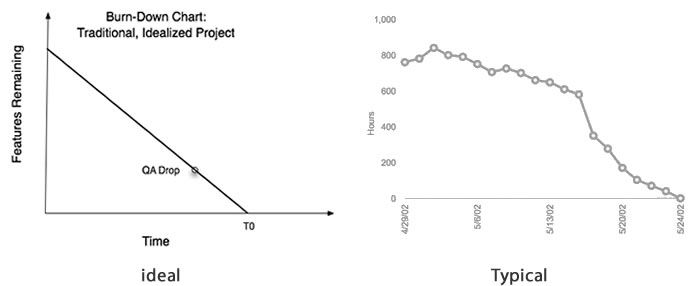
One interesting point he makes is how a happy state of mind is puts the brain in “breadth first search” mode and is more conducive for out of the box thinking, but tension and some pressure puts you in a “depth first search” mode (as dopamine gets added into the system). Moment of self realization here for me personally: as a programmer I have often preferred tighter deadlines (note: not to be confused with unrealistic) to open ended project timelines. I need the pressure to focus. A bunch of my programmer friends say they feel the same way. Thats why the burn down charts for closed work tickets is almost never the ideal one:

ideal_timeline2

(note the change of slope as projects approach end dates = more pressure)

There is often the temptation (by me anyway) to carry the model of deadline driven development to design, but Don Norman’s talk indicates that this would be a bad idea, especially if you are conceptualizing new experiences. How much pressure in terms of deadlines and deliverables can anyone apply on design teams before you kill lateral thinking thats absolutely required for creative teams. However its just as easy to fall into the time sink of finding the perfect experience. Voltaire’s quote about Good being the enemy of Great comes to mind again.

So concept in breadth first mode, execute in depth first.

The concept also seems applicable to application/web design around browse and consume. Browse pages/screens, where there isn’t an end goal really and a user is out looking for “something interesting”, should put people’s brains in breadth first mode, with more emphasis on visuals, etc, but when the user is in content consumption mode, like say on video consumption pages or web search, pages, a muted design may be a better idea. It certainly explains why Google Search pages, which most of us use to get to something we need and not really browse, work so well, but on all their other applications where users are more about entertainment than work, their designs feel awful.

Thank you Apple, May I have another…not!

Word on the street:

The Daring Fireball post talks about how Adobe is screwed now. I dont know about the financial implications, but if nothing else, the CS5 cross compiler has definitely proven how the exclusion of certain runtimes has nothing to do with performance but is a pure power play.

In other news, I am now looking for the cheapest way to get a Nexus 1. Could Adobe and Google please set up something for us refugees from the big A dictatorship?

Notes from Jonathan Rosenberg’s talk on Rules to Success

Fantastic talk by Jonathan Rosenberg, Senior Vice President, Product Management at Google on Rules to Success. The talk was so heavy with aphorisms that I ended up watching it twice and noted down his various points. They may be slightly off missing a couple of points here and there, but still pretty educational (for me at least 🙂 )

Starting note: I loved this statement at the beginning of the talk:


If you want to build a ship
don't herd people together to collect wood
and don't assign them tasks and work,
but rather teach them to long for the 
endless immensity of the sea.

Antoine-Marie-Roger de Saint-Exupery

Rules on Communication

  • Overcommunicate always all the time. You cant communcate enough.
  • Openly share everything with your collegues. Trust your people and give them this info. Trust breeds loyalty.
  • Repetition does not spoil the prayer.
  • Each word matters. Be crisp and direct and choose each word wisely. Its is not rambling: Leave out the parts that people skip. “I would have written a shorter letter if I had the time” : Mark Twain
  • Great leaders are great teachers and great teachers are great storytellers. Narrative is what that matters.
  • On Talking:
    • As leaders you learn more by listening than talking. Listening makes you humble and smart. When you listen you learn how things work, when you talk, you echo how you think things work.
    • If you must talk, ask questions. People learn more about you from your questions
    • If you actually know the answer in a business situation, talk, but back up with data.
  • Try to respond instantly. If you dont respond instantly, everything stalls.

Rules on Culture:

  • Avoid Hippos: (Highest paid person’s opinion)
  • You should not be able to read an org chart by looking at the product (for example, you cant look at the apple org chart when you look at the ipod).
  • Healthy orgs crush bureaucracy in all forms.
  • Ask for winning strategy and look for good tactics.
  • People are more productive when they are crowded. Social groups moderate bad behavior.
  • Empower the smallest of teams. Small teams accomplish more. Read the mythical man month. Create teams about the size of a family.
  • Working from home is cancer. Ban it.
  • Engineers and product managers add complexity, marketing adds management layers, sales adds coordinators.
  • Knights are knights and knaves are knaves. Tom Peters: There is no momentary lapse of integrety.
  • Focus on value rather than costs.
  • Never suggest copying a competitor. You can do better.
  • Hope is not a plan.
  • Success breeds the green eyed monster. Take away with surprise and humility.
  • Do all re-orgs in a day

Rules on Hiring:

  • Know how to interview well.
  • Gimmicks like free food, games, etc aren’t that important. People come to google to work with great people.
  • Managers don’t hire people. Committees hire people.
  • Promotions should be a peer review process.
  • Instead of laying off the bottom 10% dont hire anymore.
  • Dont hire specialists, esp in high tech. Change is the only thing permanent. “I have no special talent just passionate curiosity.” : Einstein.
  • You cannot teach passion. Nothing great was ever achieved without enthusiasm. If the enthusiasm isn’t palpable in a room, its not there.
  • Urgency of a role isnt important enough for a quick hire.
  • Identify and purge bad eggs.
  • Diversity is your best defense against myopia.
  • You cannot punt the management training program.
  • Life is not fair. Disproportionately reward risk takers and performers. Don’t tell people they did a good job if they didn’t. Real life is a meritocracy. Celebrate and reward what you want to see more of.
  • Build around the people who have the most impact.

Rules on Decision Making:

  • Decision making is about concesus and not unanimity. Dont spend hours towards unanimity. Good enough is better. Voltaire: “Perfect is enemy of the good”.
  • There is no consensus w/o dissent. Patton: If everyone is thinking alike then someone isnt thinking.
  • If there is doubt about what to do think abt customers perspective.
  • Choose your goals wisely. If the goals create conflict change the goals.
  • No-one of us is smarter than all of us.
  • Where there is harmony there is no innovation. Discuss and arguement leads new ideas and new meaning. Innovation comes from disagreement.

Rules on Fostering Innovation:

  • You cannot manage creativity to manage risks. Innovation comes from creativity.
  • Create a culture of yes based on optimism and big thinking.
  • Never stop someone from a good idea for a better one. Darwinian rule works. Best ideas win and others fail.
  • A leaders job is not to prevent risk but to recover from failures fast. Good failure happens quickly.
  • A good crisis is a terrible thing to waste. Nothing teaches like a crisis.

Rules on Humility

  • Learn something new to remember how hard its to learn. Teach something so you can learn.
  • Never stop learning. School is never out.
  • Humility is correlated with age. Arrogance is inversely correlated with age.
  • You get personal leverage from delegation and inspection. Smart people suorround themselves with smart people.
  • Judgement comes from experience and experience comes from errors. You learn more from your msitakes. At google screwups are written and archived to learn from for the future.
  • Smart ppl can smell hypocracy. Make sure you spend ur time on things you say is important. Culture is set from the top.
  • Don’t burn bridges.
  • Would you work for yourself?
  • Write a self review and be critical about yourself.
  • Communicate and confess when you make a mistake.

Final note:

Develop your own style.Styles that worked for others may not work for you (ends with the story of Cortez’s burning the boats, which may have worked for him, but Johnathan prefers the way of the Isreli tank commanders who lead by shouting “Follow me”)

Is the file system an outdated concept?

A rather interesting post by Rob Foster where he observes that no one seems to know how to use the file system, besides the Documents folder and the Desktop, and so arguably, the elimination of the visual file system in favor of “apps and their stuff” in the iPhone/iPad was a good thing (link via Daring Fireball).

As a developer, I am not a big fan of the direction Apple is going with the new locked down OS and I completely echo Alex Payne’s sentiment where he talks about the iPad and the Tinkerer’s sunset:

The thing that bothers me most about the iPad is this: if I had an iPad rather than a real computer as a kid, I’d never be a programmer today. I’d never have had the ability to run whatever stupid, potentially harmful, hugely educational programs I could download or write. I wouldn’t have been able to fire up ResEdit and edit out the Mac startup sound so I could tinker on the computer at all hours without waking my parents. The iPad may be a boon to traditional eduction, insofar as it allows for multimedia textbooks and such, but in its current form, it’s a detriment to the sort of hacker culture that has propelled the digital economy.

However that said, there does seem to be some grain of truth to the idea that I dont really know what half the folders in my file system are. Or, well, I may know theoretically what they are meant for but I dont ever use them myself so do I really need the clutter when I open Finder or Windows Explorer. For example, a while back I went from writing different text files at different locations for different reasons to writing them all in EverNote and tagging them appropriately. I dont care where EverNote is placing my files but I know to find anything I just need to launch it and search either on the text or tag.

I think we need to differentiate the concepts of the file system and the visual file system browser though. An available file system is essential for applications to write sharable data even if as an end user I may never need to see those locations. The problem of the iPad/iPhone OS is that the data produced by an application is not really sharable between applications, except for data produced by (some of) Apple’s own applications which are available as frameworks. Some developers have managed to enable inter application communication using custom URL registrations like Innerfence and their Credit Card Terminal application, but that definitely is a hack. In the linked post, the author mentions:

By registering to handle a URL scheme, an iPhone app becomes a de facto web app, subject to many of the nasty attacks that work on the web. Apps implementing this scheme must be careful to validate any parameters they get from the URL lest they be vulnerable to old friends like SQL injection. Another one to be careful of is unsolicited response attacks.

So locking down the OS seems to make my data even more vulnerable to being compromised since an application developer could have a bug in this code. The available file system enables inter application in a much better way in the Android OS, where an application can write to a location and then trigger another application passing it a reference to that location. That’s how Photoshop for Android allows developers to leverage it as an image editor in their own applications. This seems to be the exact translation of the Unix Philosophy in the mobile space and the philosophy has been validated in the Unix space over time already.

So my points are:

  • The file system itself is not an outdated concept. Applications should still have a file system to write sharable data to.
  • The visual file system showing references to rarely used locations or locations only needed by developers can be evolved to one that doesn’t show those to regular users and only shows items relevant to them (my photos, my videos, etc).

Even more, such a mechanism that could be easily evolved to do this is already available in Windows and Mac OS’s, which involves preceding the file’s name with a period. Such files are not visible to the end user but a developer can enable the “show all” behavior.

[Update] David Shoemaker also talks about Death to filesystems and notes that the Google Chrome OS is also going the same way with no filesystem the user can browse (ink via Karl’s blog), though in that case, the data is all stored on the cloud and can be made accessible via the web service’s APIs. Another aspect of that that would be really cool is that chrome browser extensions could even add custom actions to such files: For example, Picnic could create a browser extension that adds menu items to the browser’s chrome when the user is on Picasa or a new photo service and then when that is clicked on, can pull the data from the Picasa using the web service.

Value vs. Revenue

I have been working for Comcast Interactive Media for over 5 years, thats a lot by some measures and barely anything by others. This is my first full time job and as those go, not particularly shabby. Off late I have been involved in more R&D/labs/prototypes kinds of projects ever since my move to the UX Technologist position. Sometimes I still struggle with the amorphous nature of this position. Things were a lot clearer when you executed on someone else’s plan. I am closer to product development now which is great and gives me a new look at how some of the things we build get concepted. And you have these interesting conversations around things like ROI on User Experience, the importance of time invested in design vs the need for getting features out of the door quickly, the love/hate feelings towards 300×250 ads of dancing polar bears on our sites. Its fascinating to see the camps erected on either sides of these debates.

Trying to pitch a concept to a friend of mine recently, our conversation moved towards revenue models. Usually these are answered by either “well, there is slot for an ad here…” or “We’ll increase user engagement by x “. However, I realized for that at the core, I didnt really care for the rev model immediately. I was really trying to work on something valuable. Something I can look back in my later years and be proud of, not because it would help my career but because I would have made a difference (in as significant a way as a web programmer can I guess) and people would use it.

The thought of course had been crystallized by the book I have been reading: Daniel H Pink’s “Drive”, I haven’t finished it yet, but its a great read so far on what motivates people to do what they do.

Looking back, I realize I have been making these distinctions for a long time, just not realizing it: why I was glad I didn’t write an app like “iFart” even if it made a lot of money and why working on projects that I perceive no value irritates me like crazy. “Drive” says this is a fundamental human characteristic. Nothing kills morale than knowing you are working towards revenue oriented goals and not value oriented ones. That morale is hard to substitute even by money. And you can get a lot of people working on something if you convince them of the value of that. Value and revenue don’t have to be in opposition. Something valuable can and will generate revenue, but the goal of your project cannot be to make something revenue-able, it has to be to make something valuable. If your goal is revenue targeted only, your success if any would be pretty small.

Apple lost someone today too, Director Jerome B. York, and they showed it by changing their entire homepage to pay respect to him:

apple

Bet they lost some revenue on that one, but I bet it makes them a lot more valuable a company

Collected links from the whole Apple/HTC lawsuit thing

So, Apple sues HTC with over 20 patents, most of them idiotically trivial, including for example, Time-based, non-constant translation of user interface objects between states, which to the lay-developer should read “transitions”. Ah so Apple patented transitions in 2001, somebody better tell all the developers who are using things like jQuery effects, Tweenlite etc.

Steve Jobs says “We think competition is healthy, but competitors should create their own original technology, not steal ours.” , which is hilariously ironic when you see an earlier video with him saying how Apple has been shameless about stealing great ideas

This time even the die hard mac-heads call the craziness: Wil Shipley, Mac developer and author of the very successful Delicious Library application, writes an Open Letter to Steve Jobs on the whole thing.

Wait, what, you dont know who Wil Shipley is? Well he has a Wikipedia entry AND has starred in his own Penny Arcade strip. Yeah, so he’s kind of popular like that:

But I digress. Die hard mac fanboy John Gruber posts a good writeup on this whole mess, and more folk have started associating Apple with Evil, as evidenced by Paul Grahm’s comment on Hacker News and Tim Bray’s recent Tweet.

Meanwhile, Android Central posts a pretty awesome infographic on patent litigation in the mobile space

while someone tries to patent the whole practice of patent trolling. How meta…!

What applications do you use for notes and personal productivity?

For the last few months I have struggled different apps for taking and managing notes. There seem to be a fair number of tools out there but all seem to fall short of being the one “aha” application I can commit to. These days one of my primary use case is to jot down a quick idea and share it with some friends and not that many applications seem to help there.

Traditionally my notes used to be on one off text files that I would save on my desktop when I was writing them and then a week or so later figure out where among my folders I would keep them. This always bothered me as I am not a super organized person as is and would end up having 10-15 text files on my desktop before I would decide to organize them. Moreover many of these documents would contain references to information in other notes (if I could ever find them), so I began my quest for the perfect note taking application.

Here were my high level requirements:

  • Bring all my notes under one application
  • Rich formatting options
  • Be able to group documents
  • Be able to link documents from one to the other
  • Grow a document from a few lines to a comprehensive body of knowledge
  • Allow certain documents to be sharable
  • Web sync for me to access them on different devices
  • Be cross platform (I use a mac at work and a PC at home)

I have been using Evernote for the last few months and its not bad. It allows individual notes that could be tagged, web synchronization, public/private notes and had a good PC and Mac client. Thats what I am using right now. However the document formatting is okay at best and it doesnt help that most of my collaborators arent on Evernote.

For my last collaborative project I started working with shared Google Docs. It had better formatting options than Evernote and almost everyone I know seems to have a Google account these days. And since its on the web, there is no synchronization or cross platform issue. The minus: the workflow for a quick note seems wrong. I dont want to create a Google Doc for a 2 liner note (it feels fairly a formal document) and it definitely feels a more distant application than an installed application that I can launch with a couple of key presses (using QuickSilver on the Mac and Launchy for Windows).

With the announcement of Google Wave, I was pretty excited (yes I am one of the few who finds it pretty useful and wish more people started using it regularly). The format of a wave is less formal than a Google Doc, the in line contextual commenting on shared waves makes it great for documents that are still in the amorphous stage and it has options of embedding raw html and iFrames that let me embed relevant information right in the document. However it does seem to suffer from the same problem of not feeling very “on my machine”. Occasionally I need these notes in places where internet connection is spotty at best.

I have also tried other applications like VoodooPad and personal productivity applications like DevonThink, Together, Yojimbo etc and they all seem to have elements of my perfect app but they aren’t quite there yet. Actually in the last couple of weeks I have reverted to using my trusty Moleskin notebook and that almost works best.

So what do you use to take notes and such? I am curious if people already have a great way of managing information that I am missing.